
What Is Loop Engineering? AI Agents Beyond Prompting
A beginner-friendly guide to loop engineering, how it differs from prompt engineering, and why AI agents need loops to act, check, revise, and complete real work.
Prompt engineering taught us how to talk to AI.
Loop engineering is about something bigger: designing systems where AI can keep working, check its own progress, and improve the result without needing a human to type the next instruction every few minutes.
That shift matters because modern AI agents are no longer just chat boxes. They can call tools, read files, search the web, run code, use APIs, open browsers, and hand work to other agents.
Once AI can take action, the important question changes from:
"What should I ask the model?"
to:
"What loop should guide the agent until the job is done?"
That is the heart of loop engineering.
What Is Loop Engineering?
Loop engineering is the practice of designing repeatable workflows that guide, evaluate, and redirect AI agents.
A simple AI prompt is a one-time instruction:
"Write a product brief."
A loop is a system:
"Write a product brief, check whether it includes the audience, pain point, positioning, proof, and call to action. If anything is missing, revise it. Repeat until it meets the standard."
The difference is subtle but powerful.
Prompt engineering is about giving better instructions. Loop engineering is about creating a structure that keeps the work moving.
A loop usually includes:
- a clear goal
- useful context
- tools the agent can use
- a way to judge progress
- a rule for retrying or revising
- a stopping condition
- boundaries for cost, time, and permissions
In plain English, loop engineering means you stop babysitting the agent and start designing the process that manages it.
Loop Engineering vs Prompt Engineering
Prompt engineering is still useful. A good loop often contains many good prompts. But prompt engineering alone is not enough when the task is complex, uncertain, or multi-step.
| Concept | Prompt Engineering | Loop Engineering |
|---|---|---|
| Main focus | Writing one strong instruction | Designing an ongoing workflow |
| Best for | One-shot tasks | Multi-step tasks |
| Human role | Repeatedly guide the AI | Design the system that guides the AI |
| Feedback | Mostly manual | Built into the loop |
| Example | "Write this article" | "Draft, review, improve, and publish-check this article" |
A prompt says, "Do this."
A loop says, "Keep doing the right next thing until this standard is met."
A Simple Example: Planning a Trip
Imagine you ask an AI assistant:
"Plan a five-day trip to Tokyo."
It may give you a nice-looking itinerary. But you still have to check the hard parts:
- Are the routes efficient?
- Are any attractions closed that day?
- Does the plan fit your budget?
- Are the restaurants actually near the day's route?
- Is there a backup plan if it rains?
- Is the schedule too packed?
That is a prompt-based workflow. The AI gives you an answer, and you do the checking.
A loop-engineered version would look different:
- Collect travel dates, budget, hotel area, interests, and pace.
- Generate a first itinerary.
- Check opening hours and closed days.
- Check travel time between locations.
- Estimate daily cost.
- Add indoor alternatives for bad weather.
- Detect conflicts or unrealistic timing.
- Revise the itinerary.
- Run the checks again.
- Produce the final plan.
Now the AI is not just answering. It is working through a process.
If a museum is closed on Tuesday, the loop sends the plan back for revision. If one day has too much travel, the loop reshuffles the route. If the budget is too high, the loop swaps expensive options for cheaper ones.
That is loop engineering in action: act, check, revise, repeat.
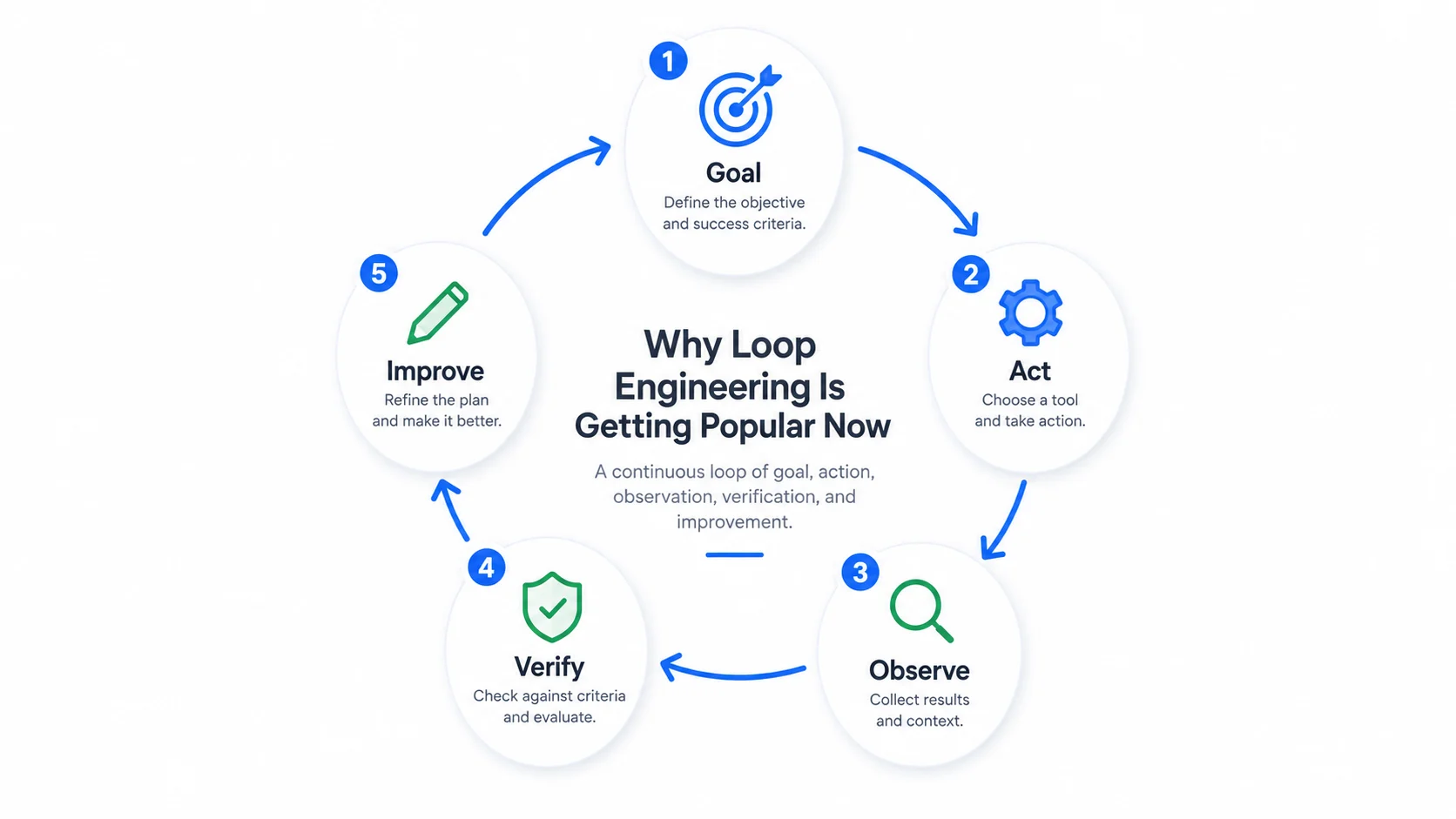
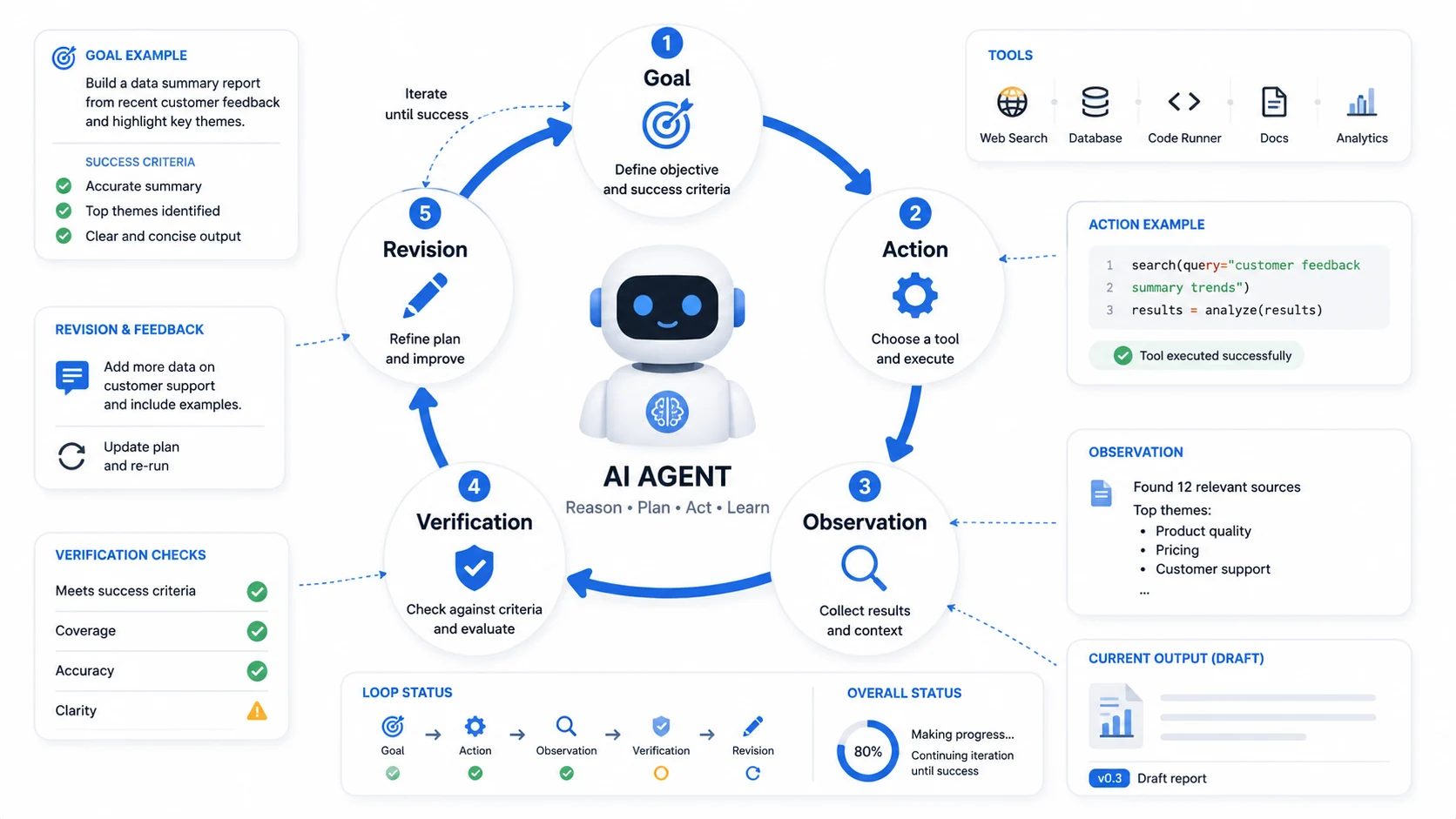
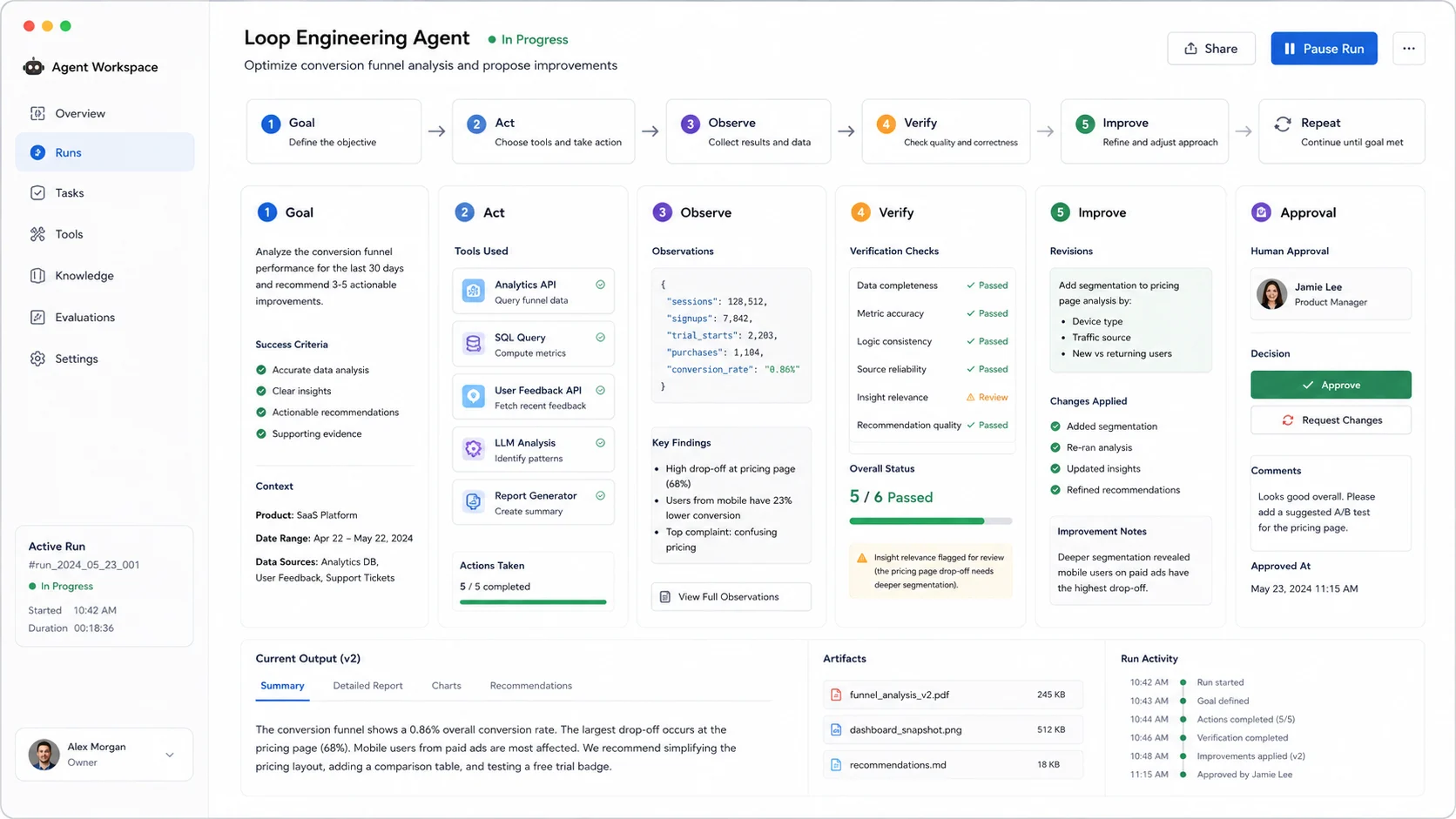
The Basic Loop: Act, Observe, Verify, Improve
Most agent loops follow a simple pattern:
Goal
-> Act
-> Observe
-> Verify
-> Improve
-> Repeat or stop
The agent does something, looks at the result, checks whether the result is good enough, and either stops or tries again.
This is closely related to ReAct-style agent design, where an agent reasons, acts, observes the result, and continues. Loop engineering takes that idea and turns it into a more deliberate system design practice.
A good loop does not simply say, "try again." It defines what "better" means.
For example:
- A writing loop may check clarity, originality, structure, and search intent.
- A coding loop may run tests, inspect errors, and revise the smallest possible change.
- A customer support loop may classify the issue, search policy, draft a reply, check tone, and escalate if confidence is low.
- A research loop may gather sources, compare claims, remove weak evidence, and summarize what is reliable.
The loop is the operating system around the agent.
Why Loop Engineering Is Getting Popular Now
Loop engineering is becoming popular because AI agents can now do more than generate text.
Tools like coding agents, browser agents, research agents, and automation platforms can operate across multiple steps. They can inspect real information, call external systems, and update their plan as new results come in.
That creates a new problem.
If the human has to manually send every next prompt, the agent is not really autonomous. The human becomes the workflow engine.
Loop engineering solves this by moving repeated decision-making into the system itself.
Instead of typing:
"Now check the sources." "Now rewrite the weak section." "Now add examples." "Now verify the output."
You design a loop that already knows when to check, when to rewrite, and when to stop.
That is why loop engineering feels like a natural next step after prompt engineering. As agents become more capable, the bottleneck moves from instruction writing to workflow design.
The Building Blocks of a Good AI Loop
A useful loop needs more than a model and a while statement.
Here are the core building blocks.
1. A Clear Goal
The loop needs a target. Vague goals produce vague loops.
Weak goal:
"Make this better."
Better goal:
"Rewrite this article so it clearly explains loop engineering to beginners, includes practical examples, uses natural language, and answers common search questions."
The clearer the goal, the easier it is to evaluate progress.
2. Context
The agent needs the right information at the right time.
That may include:
- user preferences
- brand voice
- project files
- past decisions
- examples of good output
- constraints
- source material
- previous failures
Too little context makes the agent guess. Too much context makes the loop expensive and noisy.
3. Tools
Loops become powerful when agents can act.
Common tools include:
- search
- file reading
- file editing
- code execution
- browser automation
- API calls
- database queries
- test runners
- document generation
- notification systems
The tool list should match the job. More tools are not always better.
4. Verification
This is the part many people skip.
A loop needs a way to decide whether the work is good enough. Without verification, the agent may keep polishing the wrong thing.
Verification can be simple:
- Does the answer include all required sections?
- Did the test pass?
- Is the summary under 300 words?
- Are all links valid?
- Did the user approve the draft?
Or it can be more advanced:
- run automated evaluations
- compare against examples
- ask another agent to review
- use a scoring rubric
- check logs or metrics
The best loops do not trust output just because it looks confident.
5. Stop Conditions
Every loop needs an exit.
A loop should stop when:
- the goal is met
- the maximum number of attempts is reached
- the cost limit is reached
- the agent lacks required information
- the next action is risky and needs approval
- progress has stalled
Without stop conditions, a loop can waste time, tokens, and trust.
What Can Go Wrong?
Loop engineering is powerful, but it is not magic.
Bad loops can create new problems:
- The agent repeats the same mistake.
- The loop spends too many tokens.
- The verifier is too weak.
- The agent changes things that should not be changed.
- The loop hides important decisions from the user.
- One agent grades its own work too generously.
- The system keeps optimizing for the wrong goal.
A loop is only as good as its goal, feedback, and boundaries.
The practical rule is simple:
Automate the repetition, not the judgment.
For low-risk work, the loop can run freely. For high-risk work, the loop should pause and ask for human approval before taking action.
Where Loop Engineering Is Useful
Loop engineering is useful anywhere work involves repeated checking and revision.
Good use cases include:
- SEO article creation
- code debugging
- test fixing
- research summaries
- customer support workflows
- data cleaning
- sales email personalization
- report generation
- lead qualification
- browser-based operations
- internal knowledge base maintenance
- product requirement drafts
The best candidates have three traits:
- The task happens repeatedly.
- The output can be checked.
- The agent can improve the result based on feedback.
If those three conditions exist, a loop may be worth designing.
A Practical Loop Engineering Template
Here is a simple template you can use before building an AI agent workflow:
Goal:
What should the agent accomplish?

Inputs:
What information does the agent need?

Tools:
What actions is the agent allowed to take?

First action:
How should the loop begin?

Verification:
How do we know whether the result is good?

Retry rule:
What should happen if the result is not good enough?

Stop rule:
When should the loop end?

Human approval:
Which actions require confirmation?

Output:
What should the final result look like?
For example, an SEO writing loop might look like this:
Goal:
Create a beginner-friendly article that can rank for a specific keyword.

Inputs:
Keyword, audience, search intent, outline, source notes, brand voice.

Tools:
Web research, editor, plagiarism checker, SEO checklist.

Verification:
Check title, headings, internal links, FAQ, readability, image alt text, and source quality.

Retry rule:
If the article is unclear, too generic, or missing search intent, revise.

Stop rule:
Stop after the article passes the checklist or after three revision rounds.

Human approval:
Ask before publishing.

Output:
Markdown article with metadata, image prompts, FAQ, and source links.
This is much stronger than simply asking an AI model to "write an SEO article."
Is Loop Engineering Only for Coding Agents?
No.
The term became popular partly because coding agents are a perfect example. Code has clear feedback: tests pass or fail, builds succeed or fail, lint rules catch issues, and diffs can be reviewed.
But the same design pattern applies far beyond software.
A marketing team can use loops to draft, review, and improve campaigns. A support team can use loops to classify tickets and draft replies. A researcher can use loops to collect sources, compare evidence, and flag uncertainty. A founder can use loops to monitor competitors and produce a weekly briefing.
The real idea is not coding. The real idea is controlled repetition.
Loop Engineering and Human Judgment
The goal of loop engineering is not to remove people from the process.
The goal is to stop wasting human attention on repetitive prompting.
Humans are still needed to define goals, set standards, approve risky actions, judge taste, and make tradeoffs. The loop handles the repetitive parts: checking, retrying, formatting, comparing, routing, and reminding.
A good loop feels less like a robot replacing a person and more like a reliable assistant who knows the routine.
FAQ
What does loop engineering mean?
Loop engineering means designing AI agent workflows that repeatedly act, observe, verify, and improve until a goal is reached or a stop condition is triggered.
How is loop engineering different from prompt engineering?
Prompt engineering focuses on writing better instructions for one interaction. Loop engineering focuses on designing a repeatable system that keeps prompting, checking, and guiding the agent over multiple steps.
Is loop engineering the same as ReAct?
Not exactly. ReAct is a common agent pattern built around reasoning, acting, and observing. Loop engineering is a broader design practice for building reliable loops around agents, tools, verification, memory, and human approval.
Do I need a framework to use loop engineering?
No. You can design loops manually with simple scripts, automation tools, or agent platforms. Frameworks can help, but the core idea is architectural, not tied to one tool.
What makes a good AI loop?
A good AI loop has a clear goal, relevant context, useful tools, strong verification, retry rules, stop conditions, and permission boundaries.
Final Thought
Prompt engineering is not dead. It is becoming part of a larger discipline.
The next wave of AI work is less about finding the perfect sentence to send to a model and more about designing the environment where agents can do useful work repeatedly.
That is why loop engineering matters.
It turns AI from a one-shot responder into a system that can act, check, revise, and finish.
The simplest way to remember it is this:
Prompt engineering tells AI what to do. Loop engineering designs how AI keeps working until the job is done.