
I Built a Tiny Deep Agent with LangChain
A practical, beginner-friendly walkthrough of LangChain Deep Agents with code, tools, planning, filesystem thinking, subagents, and human approval
Most AI agent demos look simple.
You give the model a task. The model calls a tool. The tool returns a result. The model writes an answer.
That is useful, but it is not enough for serious work.
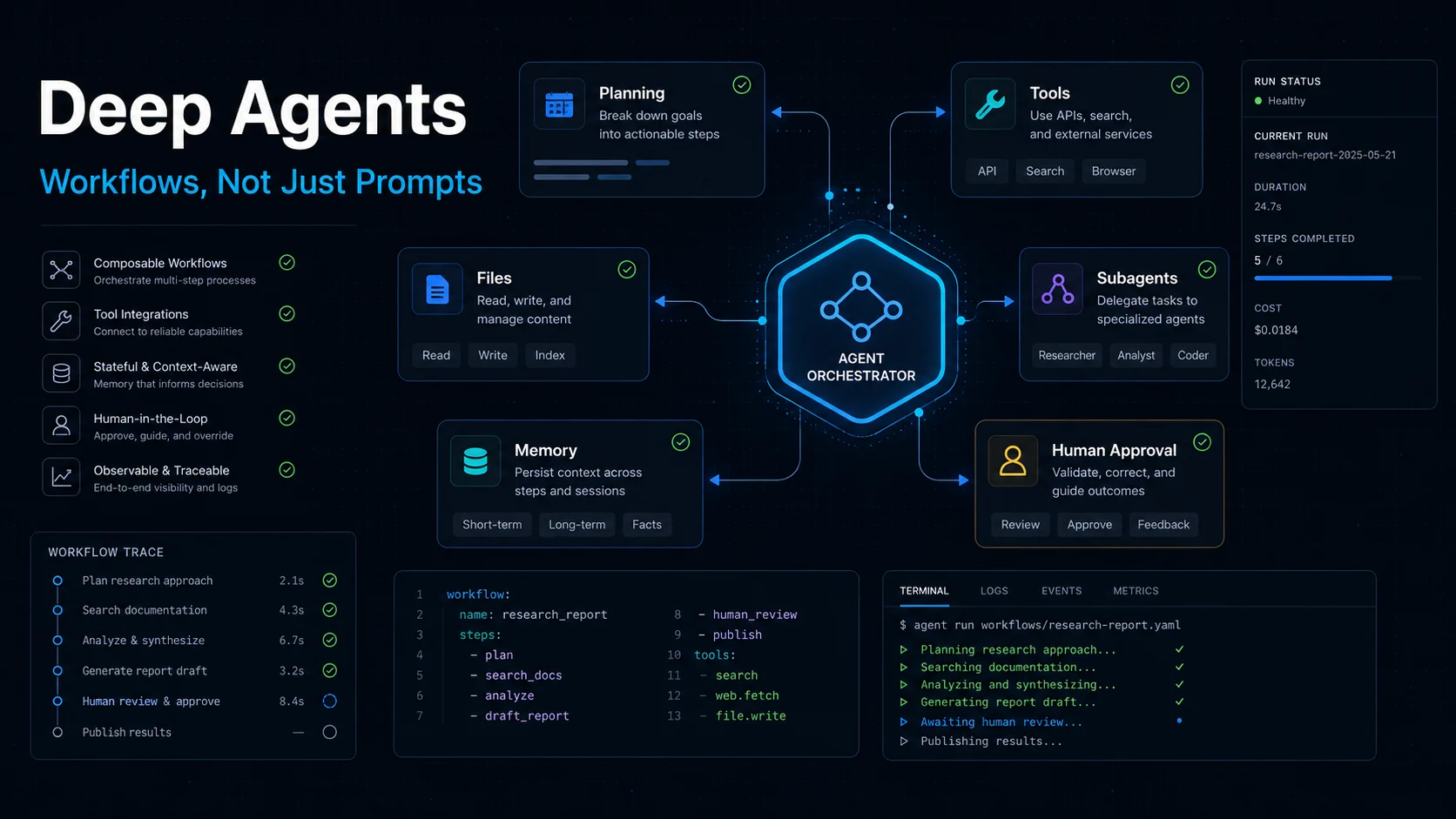
Real agents need more than tool calling. They need a working environment: planning, files, memory, subagents, context management, and sometimes human approval.
That is the idea behind LangChain's Deep Agents.
In this article, I will build a small Deep Agent example and explain the idea in plain English.
1. What Is a Deep Agent?
My simple definition:
A Deep Agent is an AI agent with a working environment.
A normal agent can call tools.
A Deep Agent can do more:
- plan multi-step work
- use custom tools
- read and write files
- delegate tasks to subagents
- manage long context
- pause for human approval
- remember useful project context
LangChain calls this an agent harness.
I like that word.
A harness means the model is not working alone. It is placed inside a controlled system that helps it do real tasks.
The mental model looks like this:
User goal
  -> Deep Agent
      -> plan
      -> use tools
      -> read/write files
      -> delegate subtasks
      -> manage context
      -> ask for approval
  -> final result
This is the shift:
Prompt engineering:
"How do I ask the model better?"

Agent workflow engineering:
"What system keeps the model working correctly?"
That second question is where Deep Agents becomes interesting.
2. Install the Packages
For a TypeScript project, install the basic packages:
npm install deepagents langchain @langchain/core zod
If you want web search, you can also install Tavily:
npm install @langchain/tavily
You will need API keys for your model provider and any external tools you use.
For example:
export ANTHROPIC_API_KEY="your_api_key"
export TAVILY_API_KEY="your_tavily_key"
You can use another model provider if your LangChain setup supports it. The important part here is not the model name. The important part is the harness around the model.
3. Start with a Simple Tool
Let’s build a small research assistant.
The agent’s job:
Given a topic, search for information and write a short builder-friendly research note.
First, create a simple search tool.
import { tool } from "langchain";
import { z } from "zod";

const searchDocs = tool(
  async ({ query }: { query: string }) => {
    return `Pretend search results for: ${query}`;
  },
  {
    name: "search_docs",
    description: "Search documentation or web notes for a topic.",
    schema: z.object({
      query: z.string().describe("The search query"),
    }),
  },
);
This is still normal tool calling.
The tool receives structured input and returns a result.
Nothing special yet.
4. Create a Deep Agent
Now we put the tool inside a Deep Agent.
import { createDeepAgent } from "deepagents";

const agent = createDeepAgent({
  tools: [searchDocs],
  systemPrompt: `
You are a practical AI research assistant for builders.

Your job:
1. Understand the user's goal.
2. Search when useful.
3. Organize findings into a clear note.
4. Avoid hype.
5. Explain what builders can do next.

Write in a simple and direct style.
`,
});
This looks small, but the idea is important.
We are no longer only writing a prompt.
We are designing an environment where the agent can act.
A normal prompt gives the model instructions.
A Deep Agent gives the model a working system.
5. Run the Agent
Now we can call it:
const result = await agent.invoke({
  messages: [
    {
      role: "user",
      content:
        "Research LangChain Deep Agents and write a short note for builders. Focus on what problem it solves and when to use it.",
    },
  ],
});

console.log(result);
For a small task, the output may look similar to a normal chatbot.
But for longer tasks, the difference becomes clear.
A Deep Agent is designed for work that may require:
- multiple steps
- tool calls
- files
- long context
- task planning
- subagents
- approval gates
That is the real value.
6. Why Files Matter
One underrated part of Deep Agents is filesystem support.
In real work, agents need a place to put things.
For example:
/research/raw-notes.md
/research/summary.md
/drafts/article.md
/checklists/fact-check.md
Without files, the agent has to keep everything inside the conversation.
That gets messy fast.
With files, the agent can save intermediate work, read it later, and keep the main context cleaner.
This is how human builders work too.
We do not keep an entire project in our head. We use folders, notes, drafts, scripts, and checkpoints.
Agents need the same thing.
7. Why Subagents Matter
Subagents are useful when a task is too large for the main agent.
For example:
Main agent:
Write the final research note.

Subagent A:
Read official docs.

Subagent B:
Find practical examples.

Subagent C:
Check limitations and risks.
The main agent does not need every detail from every search.
It only needs the final report from each subagent.
This keeps the main context clean.
My mental model is:
Main agent = coordinator
Subagents = focused workers
Filesystem = shared workspace
Tools = hands
Memory = long-term preferences
Human approval = safety gate
This is much closer to a real workflow than a single prompt.
8. Add Human Approval for Risky Actions
For demos, it is fun to let agents do everything automatically.
For real work, that can be dangerous.
If an agent can send emails, edit files, run commands, or call expensive APIs, I usually want an approval step.
A simplified pattern looks like this:
const sendEmail = tool(
  async ({
    to,
    subject,
    body,
  }: {
    to: string;
    subject: string;
    body: string;
  }) => {
    return `Email prepared for ${to}`;
  },
  {
    name: "send_email",
    description: "Send an email to a user.",
    schema: z.object({
      to: z.string(),
      subject: z.string(),
      body: z.string(),
    }),
  },
);

const safeAgent = createDeepAgent({
  tools: [sendEmail],
  systemPrompt: `
You are an assistant that drafts emails.
Before sending anything important, make sure the user can review it.
`,
});
The exact approval configuration depends on your Deep Agents setup, but the principle is simple:
Autonomy is useful.
Uncontrolled autonomy is risky.
A good agent workflow should know when to stop and ask the human.
9. When Should You Use Deep Agents?
I would use Deep Agents when the task looks like a project, not a single answer.
Good use cases:
- research assistant
- coding assistant
- report generator
- documentation maintenance agent
- internal automation agent
- data analysis workflow
- content planning and writing agent
I would not use Deep Agents for everything.
If the task is only:
User asks a question -> model answers
Then a simple chat model call is enough.
Deep Agents makes sense when the workflow needs structure.
10. The Real Lesson
The biggest lesson is not:
Agents can call tools.
We already know that.
The bigger lesson is:
Agents need a harness before they can do serious work.
A good harness gives the model:
a plan
a workspace
a tool layer
a memory layer
a delegation layer
a safety layer
That is why Deep Agents is worth studying.
It pushes builders away from prompt-only thinking and toward workflow design.
And that is where AI agents become useful.
Final Summary
Deep Agents is not about making the model magically smarter.
It is about giving the model a better working system.
If you are building a simple chatbot, you probably do not need it.
But if you are building an agent that needs to research, write, inspect files, call tools, delegate tasks, and work over multiple steps, Deep Agents is a practical starting point.
My one-line conclusion:
Deep Agents turns an LLM from a responder into a worker with a workspace.
References
- https://docs.langchain.com/oss/javascript/deepagents/overview
- https://docs.langchain.com/oss/javascript/deepagents/quickstart
- https://docs.langchain.com/oss/javascript/deepagents/tools
- https://docs.langchain.com/oss/javascript/deepagents/subagents
- https://docs.langchain.com/oss/javascript/deepagents/human-in-the-loop