
AI Coding Tools
Claude Code Plugins Guide
A practical Claude Code plugins guide for installing marketplace plugins, creating plugin.json, packaging skills, agents, hooks, MCP, LSP, and team workflows.
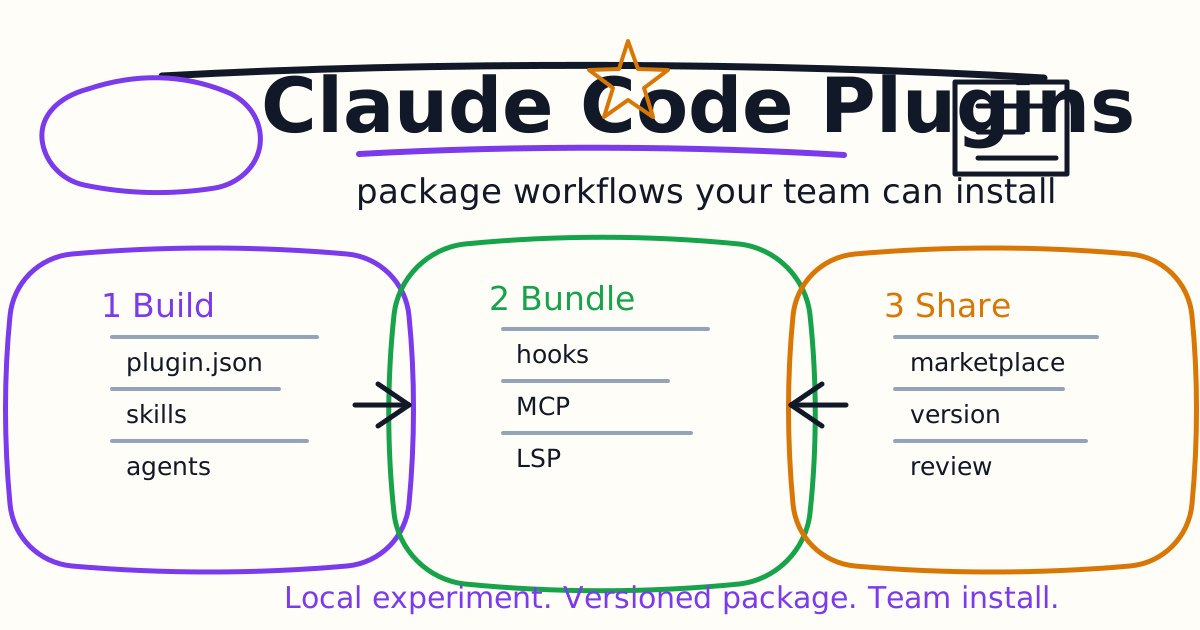
Claude Code plugins package reusable workflows into installable units. A plugin can include skills, custom agents, hooks, MCP servers, LSP servers, background monitors, binaries, and default settings. That makes plugins the right layer when a workflow has outgrown one project or one personal .claude/ folder.
This guide explains when to use a Claude Code plugin, how marketplace installation works, how to create a simple plugin, what belongs in .claude-plugin/plugin.json, how plugin components are organized, and how to avoid unsafe team rollouts.
Quick Answer
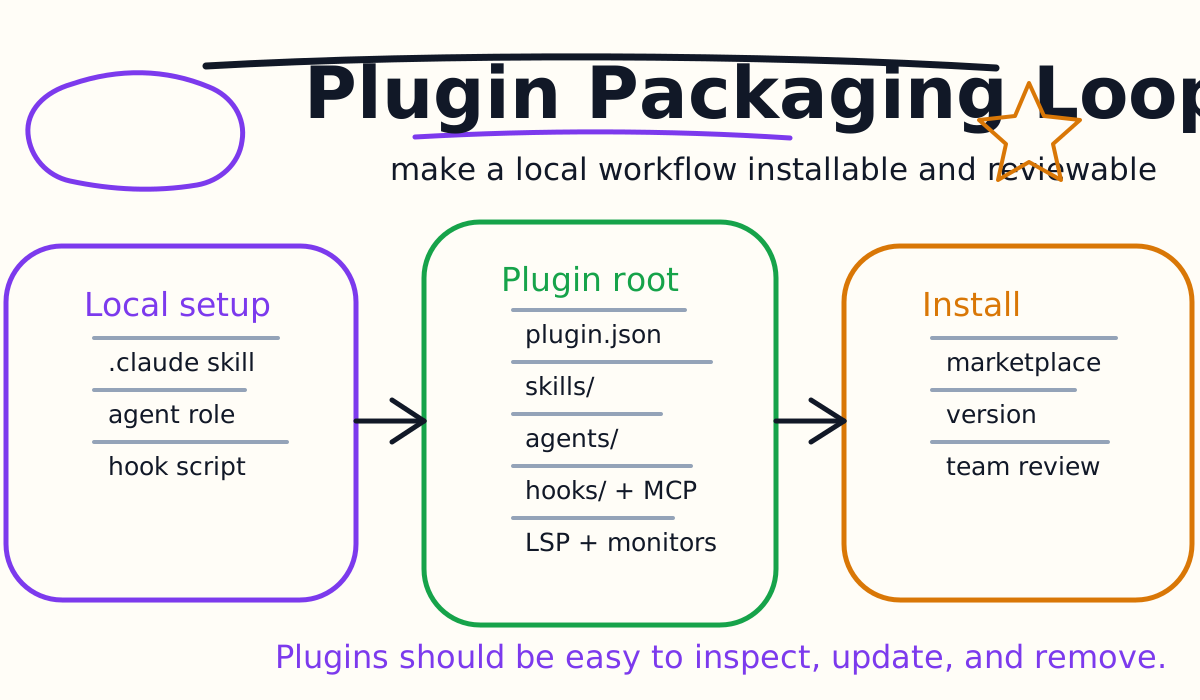
Use a Claude Code plugin when you want to share a repeatable setup across projects or teammates. Start with standalone .claude/ files while experimenting. Convert to a plugin when the workflow is stable enough to version, install, update, and document.
A safe first plugin contains one skill:
my-first-plugin/
  .claude-plugin/
    plugin.json
  skills/
    hello/
      SKILL.md
Test it locally:
claude --plugin-dir ./my-first-plugin
Then invoke the namespaced skill:
/my-first-plugin:hello
Plugin skill names are namespaced so multiple plugins can coexist without command conflicts.
Plugins vs Standalone .claude Configuration
Claude Code supports standalone configuration under .claude/ and plugins as self-contained packages.
Use Standalone .claude/ | Use Plugins |
|---|---|
| Personal workflow | Team workflow |
| One repository | Multiple repositories |
| Quick experiment | Versioned release |
| Short command name | Namespaced command |
| Manual copy to share | Marketplace or install path |
Start standalone because iteration is faster. Once a skill, hook, agent, or MCP setup becomes reusable, package it as a plugin.
Examples:
- A personal
/summarize-changesskill can stay in~/.claude/skills/. - A repository-specific release checklist can live in
.claude/skills/. - A company-wide review workflow should become a plugin.
- A security workflow with a custom reviewer agent and hook should become a plugin.
- A language intelligence setup for many teams should become a plugin.
Install Plugins From A Marketplace
Plugin marketplaces are catalogs. Adding a marketplace does not install every plugin. It only makes the catalog available. You still choose which plugins to install.
The official Anthropic marketplace is available as claude-plugins-official when Claude Code starts interactively. Browse it from:
/plugin
To install a plugin from the official marketplace:
/plugin install github@claude-plugins-official
If Claude Code cannot find a plugin, update the marketplace:
/plugin marketplace update claude-plugins-official
or add the marketplace explicitly:
/plugin marketplace add anthropics/claude-plugins-official
Do not treat marketplace installation like installing a theme. Plugins can add skills, agents, hooks, MCP servers, LSP servers, monitors, and binaries. Review what the plugin does before enabling it in a sensitive repository.
Code Intelligence Plugins
Code intelligence plugins are one of the most practical plugin categories. They connect Claude Code to language servers, giving Claude better information than plain text search.
When installed and configured, code intelligence can help Claude:
- See type errors after edits.
- Jump to definitions.
- Find references.
- Inspect symbol information.
- Trace call relationships.
- Notice missing imports or syntax errors earlier.
These plugins usually require the language server binary to be installed on the machine. For example, TypeScript code intelligence depends on a TypeScript language server. If the plugin error says an executable is not found, install the required binary rather than rewriting the plugin.
Code intelligence does not replace tests. It is an extra feedback loop, especially useful when Claude edits typed languages.
Create A First Plugin
Create the plugin directory:
mkdir my-first-plugin
mkdir my-first-plugin/.claude-plugin
Create the manifest:
{
  "name": "my-first-plugin",
  "description": "A starter plugin for reusable Claude Code workflows",
  "version": "1.0.0",
  "author": {
    "name": "Your Name"
  }
}
Then add a skill:
mkdir -p my-first-plugin/skills/review-risk
Create my-first-plugin/skills/review-risk/SKILL.md:
---
description: Reviews a diff for risky behavior changes, missing tests, and security concerns.
disable-model-invocation: true
---

Review the current change for:
- correctness bugs
- security or privacy risk
- missing tests
- surprising behavior changes

Return only serious findings and recommended verification.
Load it:
claude --plugin-dir ./my-first-plugin
Use it:
/my-first-plugin:review-risk
Plugin Directory Structure
A plugin can contain many component types:
| Path | Purpose |
|---|---|
.claude-plugin/plugin.json | Plugin identity and metadata |
skills/ | Skills with SKILL.md files |
commands/ | Legacy command-style Markdown files |
agents/ | Custom subagent definitions |
hooks/ | Hook configuration |
.mcp.json | MCP server configuration |
.lsp.json | Language server configuration |
monitors/ | Background monitor definitions |
bin/ | Executables added to tool paths |
settings.json | Default plugin settings |
The common mistake is putting component directories inside .claude-plugin/. Do not do that. Only plugin.json belongs inside .claude-plugin/. Skills, agents, hooks, and other components belong at the plugin root.
Package Agents, Hooks, And MCP
Plugins become powerful when they bundle multiple Claude Code extension points.
A code review plugin might include:
- A
/review-riskskill. - A
security-revieweragent. - A
PostToolUsehook that formats changed files. - An MCP server for internal docs.
- A TypeScript LSP plugin requirement.
That sounds useful, but it can also become too much. Add components only when they have a clear role.
Use skills for repeatable workflows. Use agents for specialized worker roles. Use hooks for deterministic automation. Use MCP when Claude needs external tool access. Use LSP when code navigation and diagnostics matter.
For the individual layers, see the Claude Code Skills and Slash Commands Guide, Claude Code Subagents Guide, Claude Code Hooks Guide, and Claude Code MCP Guide.
Convert Existing Configuration To A Plugin
If your project already has .claude/skills, .claude/commands, .claude/agents, or hooks in settings, migrate carefully:
- Create a new plugin directory.
- Add
.claude-plugin/plugin.json. - Copy skills, commands, and agents to the plugin root.
- Move hooks into
hooks/hooks.json. - Test with
claude --plugin-dir ./my-plugin. - Remove duplicate standalone files only after the plugin works.
Duplicate names can be confusing. Project and user subagent definitions may override same-named plugin agents. If a plugin does not appear to work, check whether an older standalone definition is taking precedence.
Team Rollout Checklist
Before a team installs a plugin, confirm:
- The plugin has a clear purpose.
- The
plugin.jsonmetadata is accurate. - The README explains install and usage.
- Skills are concise and do not inject secrets.
- Agents have narrow tools.
- Hooks fail safely.
- MCP servers are trusted and scoped.
- LSP binaries are documented.
- Version changes are reviewable.
- A rollback path exists.
Plugins are code-adjacent infrastructure. Review them like CI scripts or editor extensions.
Common Mistakes
The first mistake is packaging too early. If you are still changing the workflow every day, keep it standalone until it stabilizes.
The second mistake is hiding broad tool access inside a friendly plugin. Users should know what a plugin can do.
The third mistake is shipping a plugin without versioning. If the behavior changes, teams need to know what changed.
The fourth mistake is skipping local testing. Use --plugin-dir and /reload-plugins before distributing.
The fifth mistake is making one plugin do everything. Small, composable plugins are easier to trust.
Final Recommendation
Create Claude Code plugins when a workflow is useful beyond one session or one repository. Start with a single skill, test locally, then add agents, hooks, MCP, or LSP only when each layer solves a real problem.
A good plugin should make Claude Code more predictable, not more mysterious. It should be easy to install, easy to inspect, easy to update, and easy to remove.
Related Claude Code Tutorials
- Claude Code Quick Start
- Claude Code Skills and Slash Commands Guide
- Claude Code Subagents Guide
- Claude Code Hooks Guide
- Claude Code MCP Guide
- Claude Code Agent Teams Guide
- Claude Code Settings and Memory Guide
- Codex vs Claude Code
Official Sources
Decision Checklist For Claude Code Plugins Guide
Use this guide as a decision filter before a sales call, trial, or migration plan. For Claude Code Plugins Guide, the practical question is whether the topic connects Claude Code plugins, Claude Code marketplace, Claude Code skills to a measurable workflow outcome. A good decision should improve delivery speed, quality, cost control, or operational confidence without creating hidden review, security, or migration work.
- Generated changes survive code review with fewer rewrites, fewer broad diffs, and fewer style corrections.
- The assistant understands multi-file context, tests, build failures, private repository rules, and local conventions.
- Administrators can manage seats, data controls, policy settings, and usage visibility without blocking developers.
Pilot Plan
A useful pilot is small enough to finish quickly but realistic enough to expose integration, data, workflow, and pricing issues. Avoid demo-only tests. The trial should use real tasks, real constraints, and a baseline from the current process so the team can decide with evidence instead of impressions.
- Give each candidate the same bug fix, failing-test repair, refactor, and explanation task.
- Track accepted diffs, reviewer comments, rework time, test pass rate, and developer satisfaction.
- Run the trial with senior maintainers and newer engineers because the value pattern is different for each group.
Metrics To Track
Track metrics that connect Claude Code Plugins Guide to outcomes a budget owner and an engineering owner can both understand. A tool can look impressive in a demo and still fail if usage is low, quality is uneven, or the cost model changes under real workload volume.
- Accepted AI-assisted diffs, rejected suggestions, reviewer comments, and post-merge fixes.
- Time to repair failing tests, explain unfamiliar modules, and complete safe refactors.
- Seat utilization, premium request exhaustion, and policy exceptions for sensitive repositories.
Budget And Risk Review
Commercially useful AI tooling decisions should include the subscription or API price, but they should also include support load, review time, observability, privacy controls, switching cost, and the cost of wrong or low-quality output. Treat the first estimate as a working model and update it with production evidence.
- Confirm private code handling, training opt-out, data retention, and enterprise policy controls.
- Watch for over-generation: large patches that look productive but increase review cost.
- Compare cost per accepted change rather than cost per seat alone.
Revisit the assistant after 30 days of real pull requests. A useful coding tool should reduce review latency and onboarding friction without increasing risky generated code.
Editorial note
AI Jupyter writes independent guides for technical readers. Product details, pricing, and feature names can change, so readers should verify commercial terms on the official vendor site before buying.
Reviewed by the AI Jupyter Editorial Team.