
AI Coding Tools
Claude Code MCP Guide
A practical Claude Code MCP guide for connecting HTTP and stdio servers, choosing scopes, using .mcp.json, OAuth, tool permissions, and troubleshooting.
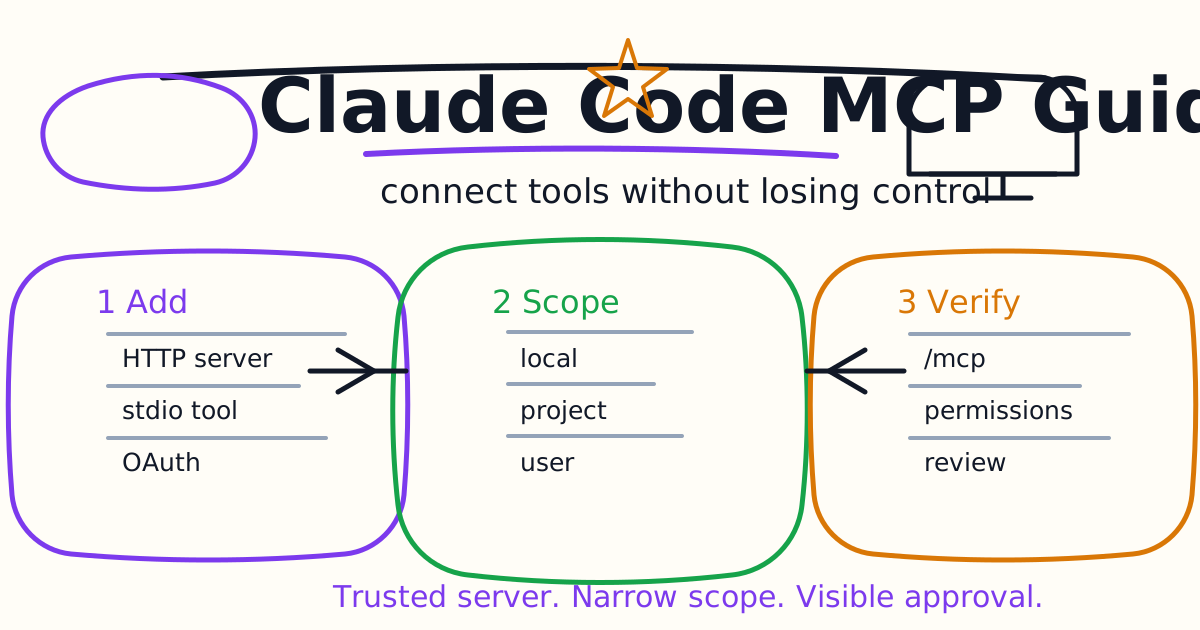
Claude Code can connect to external tools through the Model Context Protocol, usually called MCP. That matters because serious coding work rarely lives only in the repository. The task may depend on an issue tracker, a browser, Sentry errors, a database, a design tool, or an internal API.
This guide explains how to use Claude Code MCP in a practical developer workflow: when to add a server, how HTTP and stdio servers differ, how scopes work, what belongs in .mcp.json, how OAuth and headers fit in, and how to troubleshoot the most common connection failures.
Quick Answer
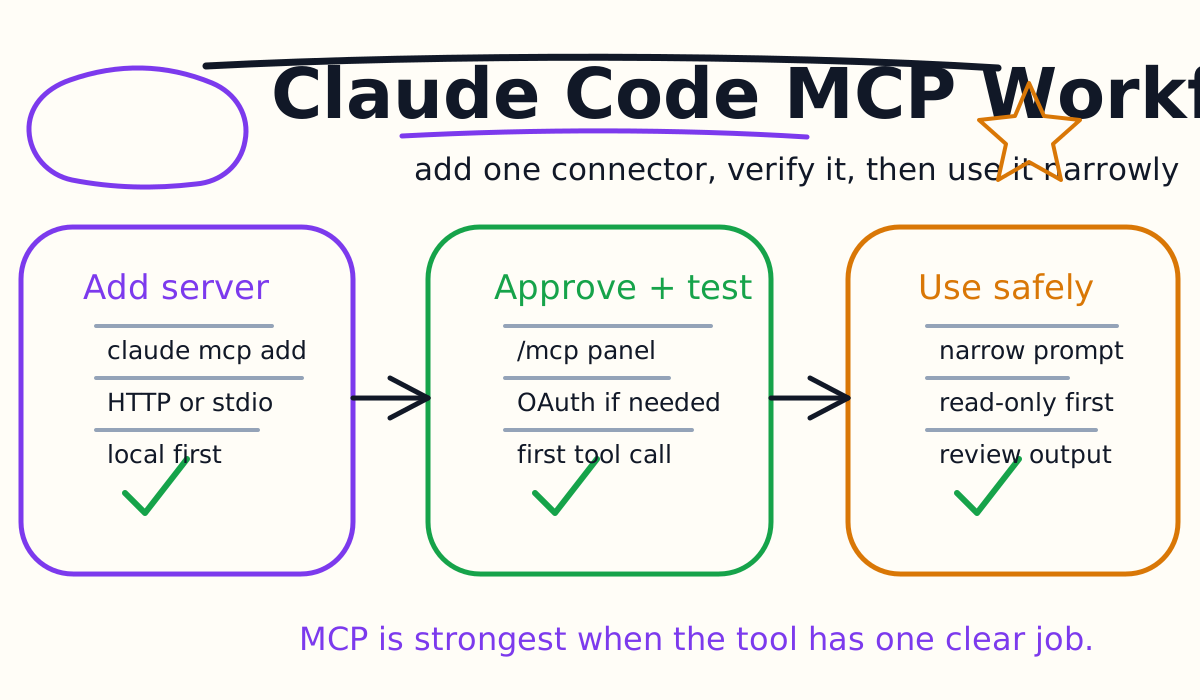
Use Claude Code MCP when Claude needs live information or actions from a tool you would otherwise copy into the chat manually. A good first setup is:
- Add one trusted server.
- Verify it with
claude mcp listor/mcp. - Start Claude Code from the project root.
- Ask a narrow task that clearly needs the tool.
- Approve the first tool call.
- Remove or disable servers you do not use.
Start with local scope for personal experiments. Use project scope only when the team intentionally wants to share the server definition through .mcp.json. Use user scope for private tools you want available across many repositories.
What MCP Adds To Claude Code
MCP servers give Claude Code additional tools. The server might search documentation, inspect a browser page, read issue details, query monitoring data, or call an internal API. Claude still reasons about the task, but the server gives it a controlled way to fetch or act on external state.
Good MCP use cases:
- Looking up an issue in Linear, Jira, or GitHub.
- Checking a Sentry error before fixing a bug.
- Opening a local web app through a browser automation server.
- Reading documentation through a documentation server.
- Querying a database through a read-only tool.
- Pulling design details from a design system or product tool.
Bad MCP use cases:
- Adding every connector because it sounds useful.
- Giving write access before read-only usage is proven.
- Putting secrets in shared repository configuration.
- Letting an untrusted server fetch arbitrary web content without review.
- Using MCP to bypass normal code review or production change controls.
The best MCP setup is boring: one connector, one purpose, one approval path, one clear rollback.
Add Your First MCP Server
Anthropic's MCP quickstart uses the Claude Code documentation server as a simple first example:
claude mcp add --transport http claude-code-docs https://code.claude.com/docs/mcp
Then verify it:
claude mcp list
Start a session:
claude
Then ask something that should use the server:
Use the claude-code-docs server to look up what MCP_TIMEOUT does.
You normally do not need to name the server in every prompt. Naming it during the first test makes the result easier to verify because you can see whether Claude used the new server instead of answering from memory.
HTTP vs Stdio Servers
Most teams will encounter two server shapes first.
HTTP servers are hosted services:
claude mcp add --transport http sentry https://mcp.sentry.dev/mcp
Use HTTP when the service is remote, maintained by another provider, or supports OAuth. It is usually the right transport for SaaS connectors.
Stdio servers run as local processes:
claude mcp add playwright -- npx -y @playwright/mcp@latest
Use stdio when the tool needs local machine access, such as a browser, a local database socket, a custom script, or a repository-aware helper. Everything after -- is the command Claude Code runs to start the server.
For custom local tools, keep the command simple and reproducible. If the server requires Node, Python, or a binary dependency, document that dependency in your project instructions.
Choose The Right Scope
Claude Code MCP has three practical scopes:
| Scope | Best For | Shared With Team | Typical Storage |
|---|---|---|---|
| local | Personal project-specific connector | No | User Claude config tied to the project |
| project | Team connector for one repository | Yes | .mcp.json in the repo |
| user | Personal connector across projects | No | User Claude config |
Use local scope first:
claude mcp add --transport http claude-code-docs https://code.claude.com/docs/mcp
Use user scope when the same private connector belongs in many projects:
claude mcp add --scope user --transport http claude-code-docs https://code.claude.com/docs/mcp
Use project scope only when the team wants a shared configuration:
claude mcp add --scope project --transport http claude-code-docs https://code.claude.com/docs/mcp
Project scope writes to .mcp.json. Treat that file like code. Review it before commit because a cloned repository should not silently gain new local processes or external connections.
A Safe .mcp.json Pattern
For team repositories, .mcp.json is useful because it makes connector setup visible:
{
  "mcpServers": {
    "claude-code-docs": {
      "type": "http",
      "url": "https://code.claude.com/docs/mcp"
    },
    "playwright": {
      "type": "stdio",
      "command": "npx",
      "args": ["-y", "@playwright/mcp@latest"]
    }
  }
}
Keep shared entries low risk:
- Prefer documentation, browser, and read-only tools first.
- Do not commit personal tokens.
- Do not point at a private production database without a review process.
- Pin or document server versions when reproducibility matters.
- Explain the purpose of each server in
CLAUDE.md.
When teammates start Claude Code in the project, they can review and approve project-scoped servers. That approval step is a feature, not friction. It prevents a repository from launching tools on a developer machine without consent.
Authentication And Secrets
Some hosted servers use OAuth. The normal flow is:
- Add the server.
- Start Claude Code.
- Run
/mcp. - Select the server.
- Choose the authentication action.
- Complete the browser sign-in.
Other servers use static headers:
claude mcp add --transport http internal-api https://api.example.com/mcp \
  --header "Authorization: Bearer YOUR_TOKEN"
Avoid writing real tokens into a shared .mcp.json. If a server needs credentials, prefer user-local configuration, environment variables, or the server's documented secret handling. A connector that works only by committing private credentials is not ready for team use.
Permissions And Prompt Injection Risk
MCP servers can expose powerful tools. A monitoring server may read private error data. A database server may return customer records. A browser server may visit untrusted pages. A GitHub server may see or alter repository state.
Use these rules:
- Trust the server provider before connecting it.
- Prefer read-only tools before write tools.
- Limit scopes to the smallest useful area.
- Watch the first few tool calls carefully.
- Remove connectors that are not actively useful.
- Never let MCP replace code review, CI, or production approval.
Prompt injection is a real concern when a server fetches external content. If Claude reads a web page, issue comment, or document controlled by someone else, that content can contain instructions aimed at the model. Treat external content as data, not authority.
Troubleshooting Checklist
If Claude Code does not see your server, run:
claude mcp list
Then check the common cases:
- No servers configured: You added the server from a different directory. Local scope is tied to the project path.
- Needs authentication: Open
/mcpin a Claude Code session and complete sign-in. - Failed to connect: Confirm the URL is reachable or run the stdio command directly.
- Server already exists: Remove the old entry or choose a new name.
- No tools appear: The server may be missing required credentials or environment variables.
- Changes to
.mcp.jsondo not apply: Restart the Claude Code session and check for JSON parse errors.
For stdio servers, run the command outside Claude Code. If it cannot start in your shell, Claude Code cannot start it either.
Claude Code MCP vs Codex MCP
Claude Code and Codex both support MCP-style tool integration, but the day-to-day workflow differs.
Claude Code MCP is configured through claude mcp, .mcp.json, /mcp, settings, and Claude-specific scopes. It fits teams already using Claude Code memory, hooks, GitHub Actions, and IDE workflows.
Codex MCP fits the OpenAI Codex workflow, especially when you are building a repository process around AGENTS.md, Codex CLI, the Codex IDE extension, and Codex cloud tasks. For the OpenAI side, see the Codex MCP Guide.
The evaluation question is not which connector system has the longest list. It is whether the connector helps the agent produce smaller, safer, better verified changes.
Common Mistakes
The first mistake is adding too many servers at once. Every server adds tool surface and context. Start with one connector and prove that it improves real tasks.
The second mistake is sharing .mcp.json before the team agrees on risk. Project scope is convenient, but it changes everyone else's Claude Code setup.
The third mistake is mixing credentials with configuration. Keep shared configuration reusable and keep secrets private.
The fourth mistake is ignoring tool output size. Long tool output can flood context. Ask for narrow data and configure server limits when needed.
The fifth mistake is letting MCP tools change production state without human review. A connector should make the workflow better, not remove the workflow.
Final Recommendation
Add MCP to Claude Code when the task truly depends on external state. Start with one trusted server, verify it in /mcp, test it on a low-risk task, and document why it exists. Use local scope for experiments, project scope for team-approved connectors, and user scope for private tools you personally need everywhere.
When MCP is used carefully, Claude Code stops being a terminal-only agent and becomes a controlled interface to the systems your repository depends on.
Related Claude Code Tutorials
- Claude Code Quick Start
- Claude Code CLI Tutorial
- Claude Code Settings and Memory Guide
- Claude Code Hooks Guide
- Claude Code Subagents Guide
- Claude Code Skills and Slash Commands Guide
- Claude Code Plugins Guide
- Claude Code Agent Teams Guide
- Claude Code VS Code Tutorial
- Claude Code GitHub Actions Guide
- Codex MCP Guide
- Codex vs Claude Code
Official Sources
Decision Checklist For Claude Code MCP Guide
Use this guide as a decision filter before a sales call, trial, or migration plan. For Claude Code MCP Guide, the practical question is whether the topic connects Claude Code MCP, Model Context Protocol, Claude Code tools to a measurable workflow outcome. A good decision should improve delivery speed, quality, cost control, or operational confidence without creating hidden review, security, or migration work.
- Generated changes survive code review with fewer rewrites, fewer broad diffs, and fewer style corrections.
- The assistant understands multi-file context, tests, build failures, private repository rules, and local conventions.
- Administrators can manage seats, data controls, policy settings, and usage visibility without blocking developers.
Pilot Plan
A useful pilot is small enough to finish quickly but realistic enough to expose integration, data, workflow, and pricing issues. Avoid demo-only tests. The trial should use real tasks, real constraints, and a baseline from the current process so the team can decide with evidence instead of impressions.
- Give each candidate the same bug fix, failing-test repair, refactor, and explanation task.
- Track accepted diffs, reviewer comments, rework time, test pass rate, and developer satisfaction.
- Run the trial with senior maintainers and newer engineers because the value pattern is different for each group.
Metrics To Track
Track metrics that connect Claude Code MCP Guide to outcomes a budget owner and an engineering owner can both understand. A tool can look impressive in a demo and still fail if usage is low, quality is uneven, or the cost model changes under real workload volume.
- Accepted AI-assisted diffs, rejected suggestions, reviewer comments, and post-merge fixes.
- Time to repair failing tests, explain unfamiliar modules, and complete safe refactors.
- Seat utilization, premium request exhaustion, and policy exceptions for sensitive repositories.
Budget And Risk Review
Commercially useful AI tooling decisions should include the subscription or API price, but they should also include support load, review time, observability, privacy controls, switching cost, and the cost of wrong or low-quality output. Treat the first estimate as a working model and update it with production evidence.
- Confirm private code handling, training opt-out, data retention, and enterprise policy controls.
- Watch for over-generation: large patches that look productive but increase review cost.
- Compare cost per accepted change rather than cost per seat alone.
Revisit the assistant after 30 days of real pull requests. A useful coding tool should reduce review latency and onboarding friction without increasing risky generated code.
Editorial note
AI Jupyter writes independent guides for technical readers. Product details, pricing, and feature names can change, so readers should verify commercial terms on the official vendor site before buying.
Reviewed by the AI Jupyter Editorial Team.