
AI Coding Tools
Claude Code Subagents Guide
A practical Claude Code subagents guide for /agents, built-in agents, project agents, tool limits, models, memory, worktrees, and safe delegation.
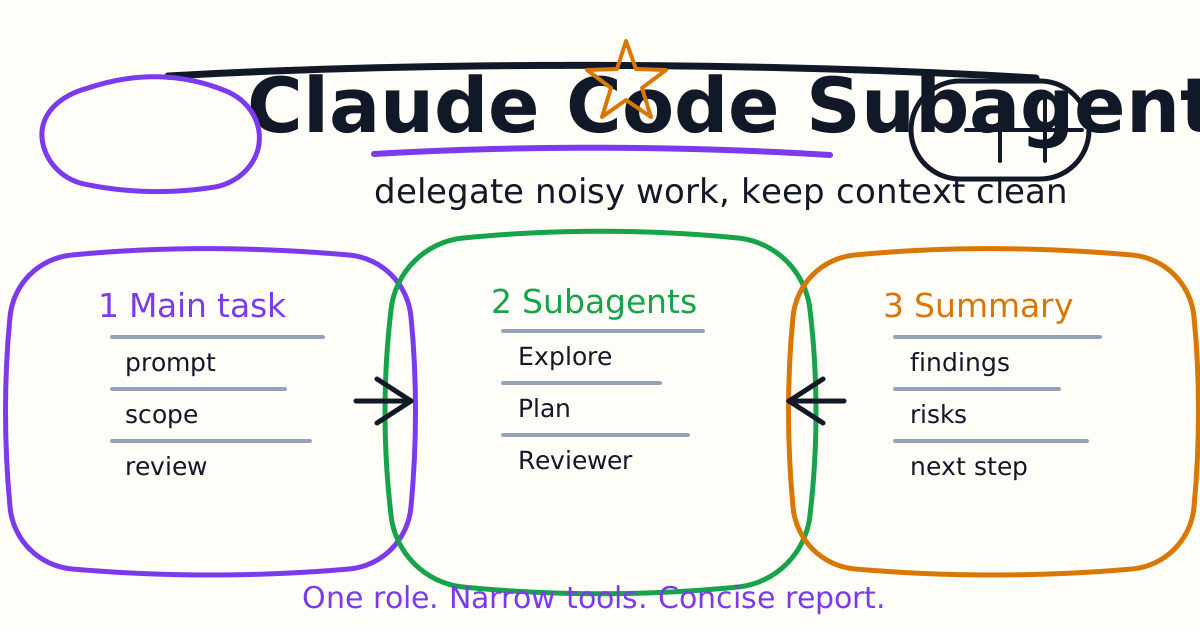
Claude Code subagents let you delegate specialized work without filling the main conversation with every search result, log line, or exploratory branch. A subagent runs in its own context, follows its own instructions, can have its own tool access, and returns a summary back to the main session.
This guide explains when to use subagents, how built-in and custom subagents differ, how to create one with /agents, what belongs in .claude/agents/, how tool limits and models work, and how to avoid common delegation mistakes.
Quick Answer
Use a Claude Code subagent when a side task has a clear role and would otherwise flood the main conversation. Good first subagents are:
- A read-only code reviewer.
- A test-failure debugger.
- A migration planner.
- A documentation auditor.
- A dependency research assistant.
- A database query validator.
Create custom subagents with /agents or by adding Markdown files under .claude/agents/ or ~/.claude/agents/. Give each subagent a clear description, narrow tools, and a short system prompt. If the subagent should only inspect code, do not give it write tools.
What Subagents Are For
A subagent is not just a longer prompt. It is a configured worker with its own context. Claude Code can delegate to it automatically when the task matches the subagent description, or you can invoke it explicitly:
Use the code-reviewer subagent to review the auth changes for correctness and security.
Subagents are useful when the task has a repeated shape. If you often ask Claude to review diffs, inspect flaky tests, scan migrations, or summarize a large folder, a subagent can turn that repeated instruction into a reusable tool.
Use subagents for:
- Keeping exploration outside the main context.
- Running a specialized checklist.
- Separating read-only review from implementation.
- Giving one worker different tools or a cheaper model.
- Reusing the same role across repositories.
- Returning concise conclusions instead of raw research.
Do not create a subagent for every tiny task. If the main conversation can handle the work clearly, keep it simple.
Built-In Subagents
Claude Code includes built-in subagents. The most important ones to understand are:
| Subagent | Typical Use | Tool Shape |
|---|---|---|
| Explore | Fast code search and repository understanding | Read-only |
| Plan | Research before a plan in plan mode | Read-only |
| General-purpose | Complex tasks that need exploration and action | Broader tools |
Explore is especially useful because it can search a codebase without polluting the main conversation with every intermediate result. Plan helps gather context before a plan. General-purpose is for more involved tasks that may need multiple steps.
You do not always need to invoke built-in subagents directly. Claude Code may delegate when it recognizes that the task fits. Still, explicit prompts are useful when you want predictable behavior:
Use a read-only subagent to map the payment module. Return only the files that matter and the risks.
Create Your First Custom Subagent
The easiest path is the /agents command:
/agents
Use the Library tab, create a new agent, choose a scope, generate or write the prompt, choose tools, choose a model, and save it.
For a first subagent, create a personal read-only code reviewer:
A code review agent that reviews changed files for correctness, security, missing tests, and behavior regressions. It should return only serious findings with file references and suggested verification.
Keep the first version read-only. A reviewer that edits files while reviewing is harder to trust. Let the main session decide whether to apply fixes after you see the findings.
Manual Subagent File
You can also create a subagent manually as a Markdown file:
---
name: code-reviewer
description: Reviews code changes for correctness, security risk, and missing tests. Use after a diff is ready.
tools: Read, Glob, Grep, Bash
model: sonnet
---

You are a senior code reviewer.

Focus on serious issues:
- correctness bugs
- security or privacy risk
- missing tests for changed behavior
- risky edge cases

Return findings first. Keep the list short. Ignore pure style unless it hides a bug.
Store it in one of these places:
| Location | Scope | Best For |
|---|---|---|
.claude/agents/ | Current project | Team-shared repository agents |
~/.claude/agents/ | Your user account | Personal agents across projects |
CLI --agents | Current session | Temporary automation or experiments |
Plugin agents/ | Plugin install | Packaged reusable agents |
Project agents are good when the role depends on repository rules. User agents are good for personal review habits that apply everywhere.
Choose Tools Deliberately
Tool access is one of the strongest reasons to use subagents. A subagent can be safer and cheaper than the main session if it only has the tools it needs.
For a read-only reviewer, use:
tools: Read, Glob, Grep
For a debugger that may run tests:
tools: Read, Glob, Grep, Bash
For an implementation worker, you may allow edit tools, but do that intentionally:
tools: Read, Glob, Grep, Edit, Write, Bash
If a subagent does not need to write files, do not give it write tools. If it only needs to search, do not give it broad shell access. The tighter the tool set, the easier it is to trust the result.
Model, Memory, And Cost
Claude Code subagents can use a model alias such as sonnet, opus, haiku, or inherit. Use this practically:
- Use Haiku-style fast agents for broad file discovery or simple search.
- Use Sonnet-style agents for code review, debugging, and planning.
- Use Opus-style agents only when the reasoning really needs it.
- Use
inheritwhen you want the subagent to match the main session.
Some subagents can also use persistent memory. That can be useful when a reviewer should learn recurring codebase patterns. It can also become stale. For team workflows, write stable rules in CLAUDE.md or project agent files before relying on memory.
For a deeper context setup, see the Claude Code Settings and Memory Guide.
Background And Worktree Isolation
Subagents can run in the foreground or background. Background execution is useful when the task is large and you want the main session to keep moving. Keep background tasks narrow:
Start a background subagent to inspect the analytics package for unused exports. Return only candidates with evidence.
For risky implementation, consider worktree isolation. A worktree-based subagent gets an isolated copy of the repository, which reduces interference with the main working tree. This is useful for experiments, migrations, and parallel candidate patches.
Use worktree isolation when:
- The agent may touch many files.
- You want an experimental branch.
- Multiple workers might edit overlapping areas.
- You want to inspect the output before merging anything.
Do not use isolation as a substitute for review. It protects your main tree from accidental edits, but you still need to review the diff.
Subagents vs Agent View vs Agent Teams
Claude Code now has several ways to run parallel work. The names can blur together, so use this simple distinction:
| Pattern | Use When |
|---|---|
| Subagent | You want a specialized worker inside one session |
| Agent view | You want to dispatch and monitor multiple sessions |
| Agent teams | You want multiple Claude Code sessions to coordinate |
| Dynamic workflows | You want scripted orchestration for many workers |
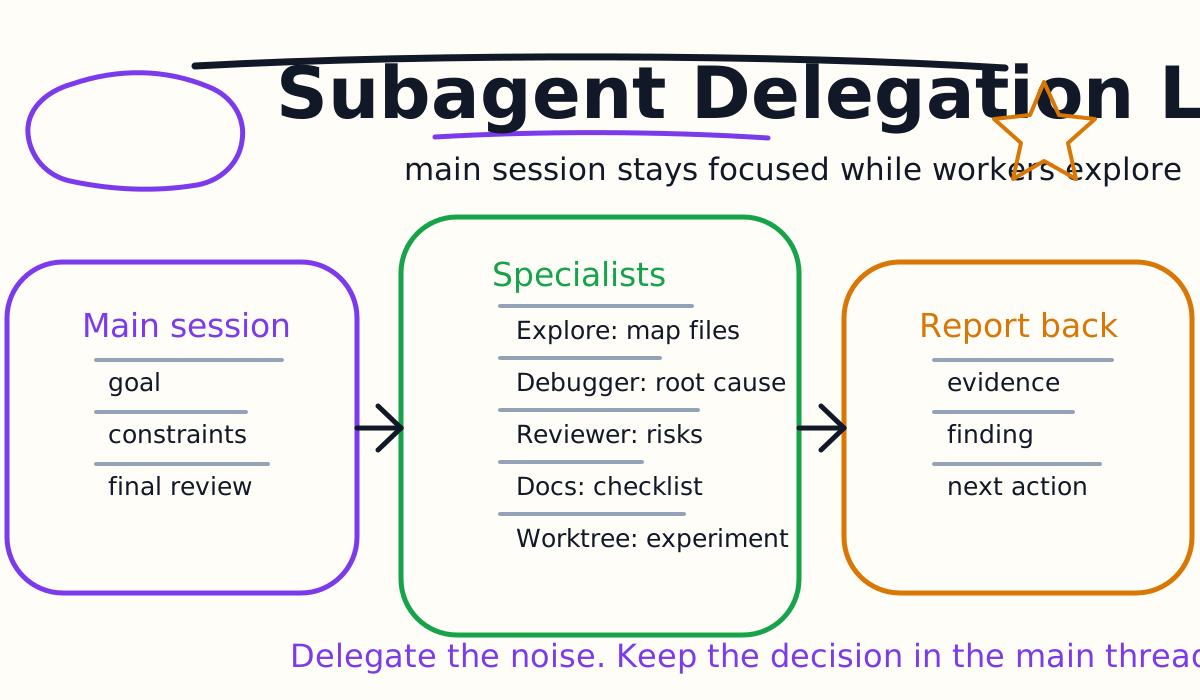
Start with subagents first. They are the easiest mental model: one main session, one delegated side task, one concise report back.
Move to agent view or agent teams when you need independent sessions that you can inspect directly. Move to dynamic workflows when the pattern is repeatable enough to script.
Good Subagent Prompts
A good subagent prompt has four parts:
- The role.
- The scope.
- The allowed evidence.
- The return format.
Example:
Use the code-reviewer subagent to review the current diff for auth regressions.
Only report findings that could affect correctness, security, privacy, or tests.
Return at most five findings, each with file path, risk, and recommended verification.
Do not edit files.
This gives the subagent a job and prevents a noisy review. The phrase "do not edit files" matters even if the subagent has limited tools, because it also clarifies intent.
Common Patterns
Use a research subagent when a task needs broad reading:
Use a subagent to map the upload pipeline. Return the files, data flow, and likely test commands.
Use a reviewer after a patch:
Use the code-reviewer subagent to inspect the diff. Focus on behavior regressions and missing tests.
Use a debugger for failing tests:
Use the debugger subagent to analyze this failing test output. Find the likely root cause before editing.
Use a migration planner before touching many files:
Use a planning subagent to propose a phased migration plan for replacing this deprecated API.
In every case, ask for a concise summary. The subagent's value is not that it can return a lot of text. Its value is that it can reduce a noisy task into a small decision.
Common Mistakes
The first mistake is creating a vague subagent such as "helpful coder." That is just the main agent with another name. Give the subagent a real specialty.
The second mistake is giving every subagent all tools. A read-only reviewer should not have write access.
The third mistake is using subagents for tasks that need continuous human steering. If you need to guide every step, keep the work in the main conversation.
The fourth mistake is accepting a subagent summary without checking the evidence. Ask for file paths, commands, and assumptions.
The fifth mistake is creating duplicate agent names across scopes. Keep names unique and descriptive.
Final Recommendation
Start with one custom Claude Code subagent: a read-only code reviewer. Use it after small diffs. If that saves review time, add a debugger or documentation auditor. Keep tools narrow, prompts short, and output concise.
Subagents are not a way to avoid thinking. They are a way to keep the main conversation focused while specialized workers do bounded work in their own context.
Related Claude Code Tutorials
- Claude Code Quick Start
- Claude Code CLI Tutorial
- Claude Code Settings and Memory Guide
- Claude Code Skills and Slash Commands Guide
- Claude Code Plugins Guide
- Claude Code Agent Teams Guide
- Claude Code MCP Guide
- Claude Code Hooks Guide
- Claude Code GitHub Actions Guide
- Codex vs Claude Code
Official Sources
Decision Checklist For Claude Code Subagents Guide
Use this guide as a decision filter before a sales call, trial, or migration plan. For Claude Code Subagents Guide, the practical question is whether the topic connects Claude Code subagents, Claude Code agents, AI coding workflow to a measurable workflow outcome. A good decision should improve delivery speed, quality, cost control, or operational confidence without creating hidden review, security, or migration work.
- Generated changes survive code review with fewer rewrites, fewer broad diffs, and fewer style corrections.
- The assistant understands multi-file context, tests, build failures, private repository rules, and local conventions.
- Administrators can manage seats, data controls, policy settings, and usage visibility without blocking developers.
Pilot Plan
A useful pilot is small enough to finish quickly but realistic enough to expose integration, data, workflow, and pricing issues. Avoid demo-only tests. The trial should use real tasks, real constraints, and a baseline from the current process so the team can decide with evidence instead of impressions.
- Give each candidate the same bug fix, failing-test repair, refactor, and explanation task.
- Track accepted diffs, reviewer comments, rework time, test pass rate, and developer satisfaction.
- Run the trial with senior maintainers and newer engineers because the value pattern is different for each group.
Metrics To Track
Track metrics that connect Claude Code Subagents Guide to outcomes a budget owner and an engineering owner can both understand. A tool can look impressive in a demo and still fail if usage is low, quality is uneven, or the cost model changes under real workload volume.
- Accepted AI-assisted diffs, rejected suggestions, reviewer comments, and post-merge fixes.
- Time to repair failing tests, explain unfamiliar modules, and complete safe refactors.
- Seat utilization, premium request exhaustion, and policy exceptions for sensitive repositories.
Budget And Risk Review
Commercially useful AI tooling decisions should include the subscription or API price, but they should also include support load, review time, observability, privacy controls, switching cost, and the cost of wrong or low-quality output. Treat the first estimate as a working model and update it with production evidence.
- Confirm private code handling, training opt-out, data retention, and enterprise policy controls.
- Watch for over-generation: large patches that look productive but increase review cost.
- Compare cost per accepted change rather than cost per seat alone.
Revisit the assistant after 30 days of real pull requests. A useful coding tool should reduce review latency and onboarding friction without increasing risky generated code.
Editorial note
AI Jupyter writes independent guides for technical readers. Product details, pricing, and feature names can change, so readers should verify commercial terms on the official vendor site before buying.
Reviewed by the AI Jupyter Editorial Team.