
AI Coding Tools
Codex Cloud Environment Setup Guide
A practical Codex Cloud environment setup guide for setup scripts, package installs, secrets, cache resets, internet access, and AGENTS.md.
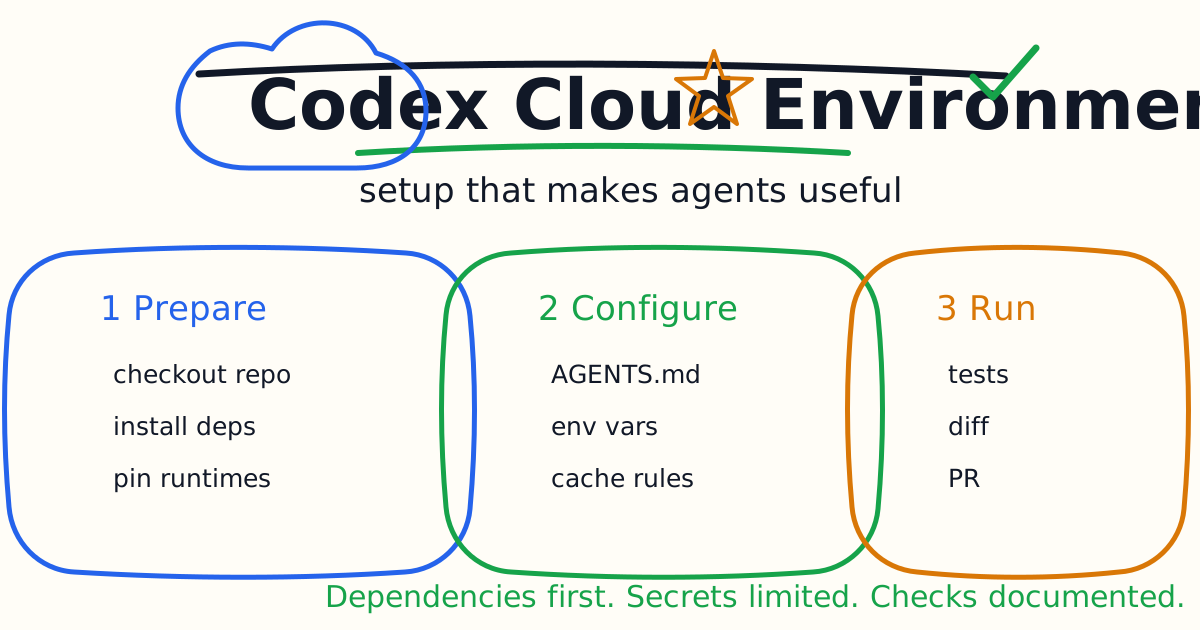
Codex Cloud tasks are only as reliable as the environment they run in. If dependencies are missing, package versions drift, test commands are undocumented, or secrets are handled carelessly, the agent may spend most of its time fighting setup instead of solving the task.
This guide explains how to set up a practical Codex Cloud environment: package installs, setup scripts, maintenance scripts, environment variables, secrets, cache resets, internet access, and repository guidance.
Quick Answer
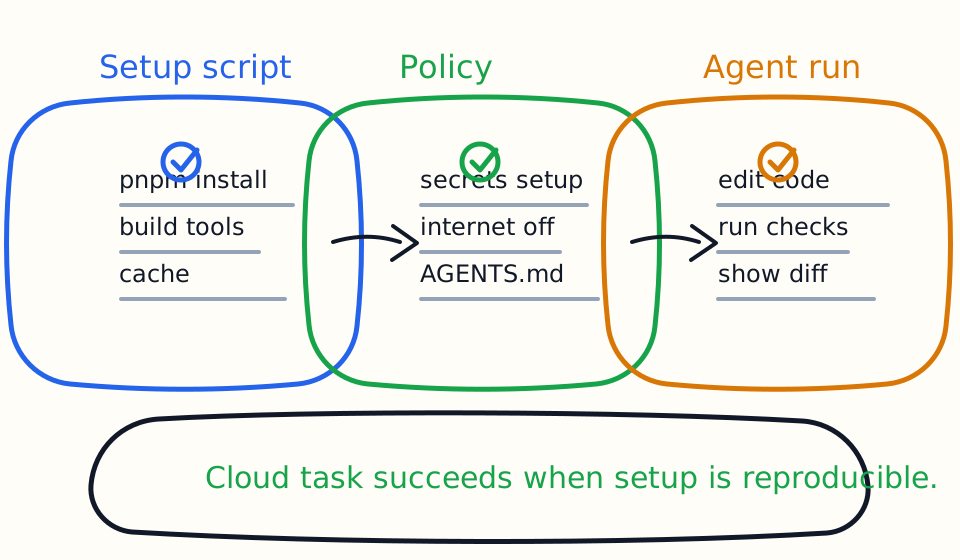
Create a Codex Cloud environment before you delegate serious work. Start with automatic setup if your project uses common package managers. Add a manual setup script when the project needs extra tools, multiple package installs, generated files, or build steps.
Put durable project instructions in AGENTS.md: package manager, setup commands, lint commands, test commands, build commands, and directories Codex should avoid. Use secrets only for setup scripts because secrets are removed before the agent phase. Reset the environment cache when setup changes.
What Happens During A Cloud Task
The official Codex Cloud environment flow has a predictable shape:
- Codex creates a container.
- It checks out your repository at the selected branch or commit.
- It runs your setup script.
- It may run a maintenance script when resuming a cached container.
- It applies your internet access settings.
- The agent edits code, runs commands, and validates work.
- It returns an answer and a diff.
- You can open a pull request or ask follow-up questions.
That means environment setup is not background decoration. It is the first part of every cloud task.
Start With The Universal Image
Codex Cloud uses a default container image with common languages, packages, and tools. For many repositories, that is enough to start. If your project depends on specific runtime versions, use environment settings to pin versions for languages such as Node.js or Python.
Use the default image when:
- The project uses standard package managers.
- Dependencies install cleanly.
- Tests can run without private services.
- Runtime version requirements are flexible or documented.
Add manual setup when:
- You need extra system packages.
- You need multiple package managers.
- You need generated code before tests.
- You need a local service or tool.
- Automatic setup misses a project-specific command.
Automatic Setup
Automatic setup can install dependencies for common ecosystems such as npm, yarn, pnpm, pip, pipenv, and poetry.
Use automatic setup first for simple repositories. Then run a small cloud task that only asks Codex to inspect the project and run the main checks:
Verify that this repository environment is ready. Do not edit files. Identify the package manager, install state, lint command, test command, and build command. Run the safest available check and report any setup issue.
If Codex cannot find the right commands, do not solve that with a longer prompt every time. Add the commands to AGENTS.md.
Manual Setup Script
Use a setup script when the repository needs explicit preparation. Examples:
pnpm install
pnpm build
pip install pyright
poetry install --with test
pnpm install
Keep setup scripts deterministic. Avoid interactive prompts. Avoid writing machine-specific paths. Avoid depending on files that are not committed or provided through environment settings.
One subtle detail matters: setup scripts run in a separate Bash session from the agent. A plain export FOO=bar in setup does not automatically persist into the agent phase. If a value must persist, configure it as an environment variable or write appropriate shell initialization.
Maintenance Script And Cache
Codex caches container state to speed up future tasks and follow-ups. That is good for speed, but it can surprise you when dependencies change.
Use a maintenance script when a cached container needs lightweight refresh work, such as:
pnpm install --frozen-lockfile
Reset the cache when:
- The setup script changes.
- Runtime versions change.
- Lockfiles change in a way that breaks cached dependencies.
- Generated files are stale.
- Codex repeatedly reports setup issues that should already be fixed.
For Business and Enterprise workspaces, shared cache behavior can affect teammates who use the same environment. Treat cache resets as a workspace-level action, not just a personal preference.
Environment Variables And Secrets
Environment variables are available for the full task, including setup and the agent phase. Secrets are more restricted. They are encrypted and only available to setup scripts; for security, they are removed before the agent phase.
Use environment variables for non-sensitive configuration:
- Feature flags for tests.
- Local test endpoints.
- Safe public configuration.
- Build mode settings.
Use secrets only when setup truly needs them:
- Private package registry tokens.
- Private dependency access.
- Temporary credentials for installing tools.
Do not design a cloud task that requires the agent to read production secrets. If the agent needs live production credentials to complete the task, the task is probably too risky for a general coding agent workflow.
Internet Access
Setup scripts can use internet access to install dependencies. During the agent phase, internet access is off by default unless you configure limited or unrestricted access.
Keep agent internet access off for most code tasks. Turn it on only when the task genuinely needs current external documentation, package metadata, or a controlled network target. If you enable it, prefer limited access to specific domains rather than unrestricted access.
For local and CI automation risk patterns, see the Codex Permissions and Sandbox Guide.
Add AGENTS.md
AGENTS.md is the most important file for repeatable cloud tasks. It tells Codex how the repository works without forcing you to repeat the same setup details in every prompt.
Include:
- Package manager.
- Install command.
- Dev server command.
- Lint command.
- Type-check command.
- Test command.
- Build command.
- Paths to avoid.
- Deployment boundaries.
- Review expectations.
Example:
# AGENTS.md

Use pnpm.

Common commands:
- pnpm install
- pnpm lint
- pnpm test
- pnpm build

Before finishing a code change, run the closest relevant test. For UI changes,
also check that mobile layout has no document-level horizontal scroll.

Do not edit generated files in .next, dist, coverage, or node_modules.
For a deeper template, see the Codex AGENTS.md Guide.
First Cloud Task To Run
After setting up the environment, run a no-edit smoke test:
Do not edit files. Inspect this repository and verify the cloud environment. Identify the package manager, setup status, lint command, test command, build command, and any missing dependency or environment variable. Run one safe check if available.
Then run a small edit task:
Fix one failing test related to the smallest reproducible failure. Keep the patch minimal, run the specific test, and explain any test that could not be run.
If the first edit task fails because setup is incomplete, fix the environment before sending more feature work.
IDE Delegation
The Codex IDE Extension Tutorial covers cloud delegation from an editor. The same environment principles apply. A task started from the IDE can preserve conversation context, but the cloud runner still needs dependencies, scripts, and repository rules.
Use cloud delegation when:
- The task is larger than a quick local edit.
- You want work to continue while you do something else.
- The repository can build and test in the cloud.
- The task does not depend on a local-only service.
Stay local when the task depends on screenshots, local browser state, private local files, or a running service that does not exist in the cloud environment.
Common Environment Mistakes
The first mistake is assuming the cloud runner has the same state as your laptop. It does not. If a generated file, local dependency, or environment variable is required, make it reproducible.
The second mistake is hiding setup knowledge in prompts. Put durable commands in AGENTS.md or the environment setup script.
The third mistake is giving internet access to the agent phase without a reason. Most code tasks only need repository files and package scripts.
The fourth mistake is using secrets as if they were runtime variables for the agent. Secrets are designed for setup, not for arbitrary agent use.
The fifth mistake is ignoring cache. If a task keeps failing after setup changes, reset the cache before assuming Codex misunderstood the code.
Best Setup Checklist
Before asking Codex Cloud for serious work, confirm:
- The repository checks out cleanly.
- Dependency installation is deterministic.
- Runtime versions are pinned when needed.
- Setup script completes without interaction.
- Maintenance script handles cached updates.
AGENTS.mddocuments commands and constraints.- Secrets are limited to setup.
- Agent internet access is off or narrowly scoped.
- A no-edit environment smoke test passes.
- The first edit task is small and reviewable.
Once those basics are in place, cloud tasks become much more useful. Codex can spend its time solving the engineering problem instead of guessing how your project is supposed to run.
Related Codex Tutorials
- Codex Cloud Tasks Guide
- Codex IDE Extension Tutorial
- Codex AGENTS.md Guide
- Codex Permissions and Sandbox Guide
- Codex Exec Automation Guide
- Codex GitHub Action Tutorial
- Codex CLI Tutorial
- Codex vs Claude Code
Official References
Decision Checklist For Codex Cloud Environment Setup Guide
Use this guide as a decision filter before a sales call, trial, or migration plan. For Codex Cloud Environment Setup Guide, the practical question is whether the topic connects Codex Cloud, Codex environment, AI coding agent to a measurable workflow outcome. A good decision should improve delivery speed, quality, cost control, or operational confidence without creating hidden review, security, or migration work.
- Generated changes survive code review with fewer rewrites, fewer broad diffs, and fewer style corrections.
- The assistant understands multi-file context, tests, build failures, private repository rules, and local conventions.
- Administrators can manage seats, data controls, policy settings, and usage visibility without blocking developers.
Pilot Plan
A useful pilot is small enough to finish quickly but realistic enough to expose integration, data, workflow, and pricing issues. Avoid demo-only tests. The trial should use real tasks, real constraints, and a baseline from the current process so the team can decide with evidence instead of impressions.
- Give each candidate the same bug fix, failing-test repair, refactor, and explanation task.
- Track accepted diffs, reviewer comments, rework time, test pass rate, and developer satisfaction.
- Run the trial with senior maintainers and newer engineers because the value pattern is different for each group.
Metrics To Track
Track metrics that connect Codex Cloud Environment Setup Guide to outcomes a budget owner and an engineering owner can both understand. A tool can look impressive in a demo and still fail if usage is low, quality is uneven, or the cost model changes under real workload volume.
- Accepted AI-assisted diffs, rejected suggestions, reviewer comments, and post-merge fixes.
- Time to repair failing tests, explain unfamiliar modules, and complete safe refactors.
- Seat utilization, premium request exhaustion, and policy exceptions for sensitive repositories.
Budget And Risk Review
Commercially useful AI tooling decisions should include the subscription or API price, but they should also include support load, review time, observability, privacy controls, switching cost, and the cost of wrong or low-quality output. Treat the first estimate as a working model and update it with production evidence.
- Confirm private code handling, training opt-out, data retention, and enterprise policy controls.
- Watch for over-generation: large patches that look productive but increase review cost.
- Compare cost per accepted change rather than cost per seat alone.
Revisit the assistant after 30 days of real pull requests. A useful coding tool should reduce review latency and onboarding friction without increasing risky generated code.
Editorial note
AI Jupyter writes independent guides for technical readers. Product details, pricing, and feature names can change, so readers should verify commercial terms on the official vendor site before buying.
Reviewed by the AI Jupyter Editorial Team.