
AI Coding Tools
Codex Permissions and Sandbox Guide
A practical Codex permissions and sandbox guide for choosing read-only, workspace-write, approvals, network access, and full access safely.
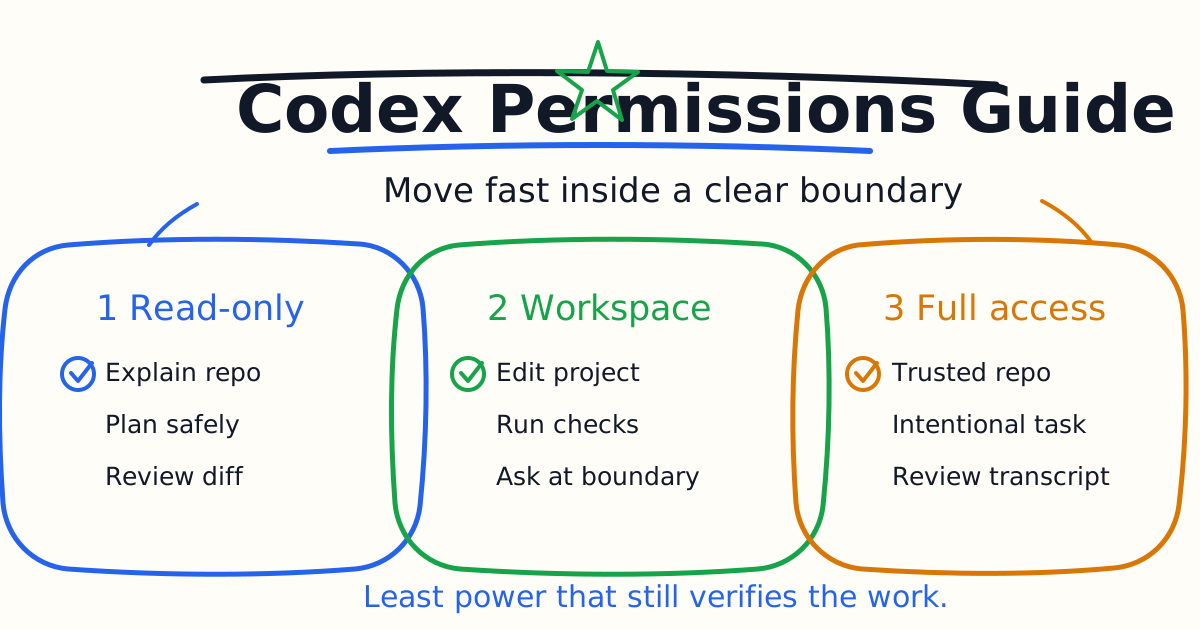
Codex is useful because it can inspect a repository, edit files, run commands, and verify its work. That power needs a boundary. Permissions, sandboxing, approvals, and network access decide how much Codex can do on its own before it has to stop and ask for permission.
This guide explains the practical choices: when to use read-only mode, when workspace-write is the right default, when approvals matter, why network access should stay narrow, and why full access should be reserved for trusted situations.
Quick Answer
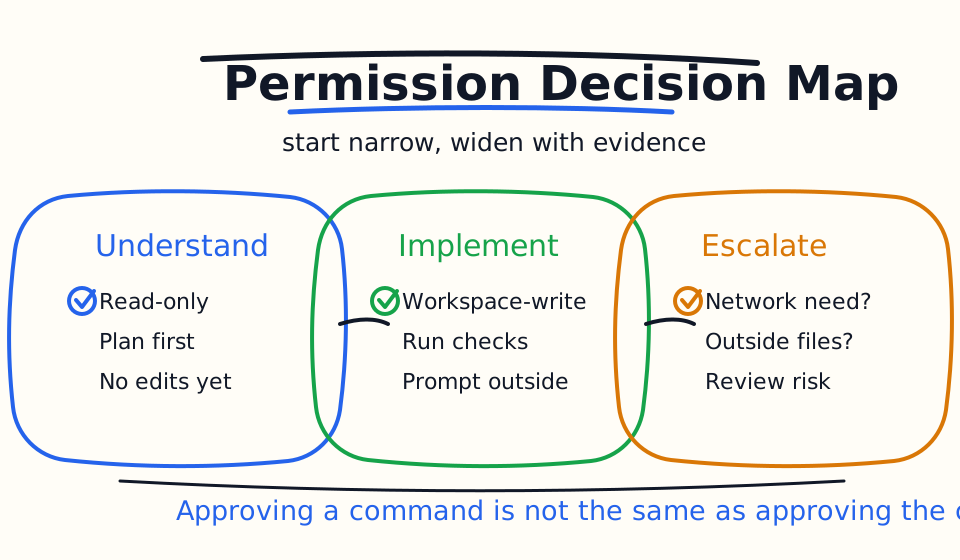
Use read-only when you want Codex to explain, plan, review, or investigate without changing files. Use workspace-write with on-request approvals for most local repository work. It lets Codex read files, edit within the workspace, and run routine commands while still asking before it crosses the sandbox boundary. Use full access only when you trust the repository, the task, and the consequences of unrestricted filesystem and network access.
The safest default for day-to-day development is not maximum restriction and not maximum freedom. It is a clear sandbox with focused approvals.
The Two Controls: Sandbox And Approval Policy
Codex security controls come from two related but different systems.
The sandbox defines what Codex can technically do. It controls boundaries such as which files can be modified and whether spawned commands can use the network.
The approval policy defines when Codex must pause and ask before taking an action. For example, Codex may be able to edit inside the workspace automatically, but still need approval to touch files outside the workspace or use network access.
Think of it this way:
| Control | Question It Answers |
|---|---|
| Sandbox mode | What can Codex do inside the technical boundary? |
| Approval policy | When must Codex ask before crossing a boundary? |
| Network settings | Can commands reach external destinations? |
| Rules | Which command prefixes are allowed, prompted, or forbidden? |
This separation matters because approvals do not replace sandboxing. A good setup uses both.
Read-Only Mode
Use read-only mode when you want Codex to understand before it acts.
Good read-only tasks include:
- Explain this repository.
- Find the likely source of this bug.
- Review my diff for risks.
- Create a migration plan.
- Identify the narrowest test to run.
- Compare two implementation options.
Read-only mode is also a good first step in an unfamiliar repository. If Codex cannot explain the codebase clearly, it is not ready to edit it.
Prompt example:
Work in read-only mode. Map the authentication flow, identify the files that matter, and recommend the smallest safe change. Do not edit files yet.
Workspace-Write Mode
workspace-write is the practical default for most local coding sessions. Codex can read the repository, edit files in the workspace, and run routine local commands inside the sandbox boundary. With an on-request approval policy, Codex asks before it needs to go beyond that boundary.
Use it for:
- Fixing one failing test.
- Updating a component.
- Adding a validation rule.
- Improving documentation.
- Running a local build or type check.
- Reviewing and repairing a narrow diff.
A strong first command looks like:
codex --sandbox workspace-write --ask-for-approval on-request
Then give Codex a focused prompt:
Goal: Fix the failing upload validation test.

Constraints: Edit only the related validation path. Do not add a dependency. Run the closest related test.
Full Access
Full access removes the ordinary sandbox restrictions. It is useful only when the task genuinely needs broad filesystem or network authority and you trust the repository and task.
Do not use full access just because it avoids prompts. Approval friction is often a signal that the task is crossing a meaningful boundary.
Avoid full access for:
- Unknown repositories.
- Untrusted scripts.
- Tasks involving credentials.
- Production databases or infrastructure.
- Broad cleanup tasks.
- Web content that may contain prompt injection.
Use full access sparingly and intentionally. Review the transcript and final diff like you would review a powerful script.
Network Access
By default, local Codex workflows keep command network access off unless you enable it. That is a good default. Many coding tasks can run with local files, package scripts, and tests.
Enable network access when the task truly needs it:
- Installing missing dependencies.
- Fetching current official documentation.
- Testing an API integration against a safe endpoint.
- Running a tool that requires a known external service.
Prefer allowlists and scoped rules over broad network access. A task that needs api.openai.com does not automatically need the whole internet.
Rules For Repeated Exceptions
If the same safe command keeps needing approval, use rules instead of removing the sandbox. Rules let you allow, prompt, or forbid command prefixes.
Good rule candidates:
pnpm run testnpm run buildpytestcargo test- A local lint command
Bad rule candidates:
- Broad
pythonexecution with arbitrary script paths. - Unscoped shell pipelines.
- Commands that download and execute remote code.
- Destructive file operations.
Rules should reduce repetitive safe prompts, not erase your trust boundary.
Permissions For Common Workflows
| Workflow | Recommended Starting Point |
|---|---|
| Explain a repository | Read-only |
| Review a diff | Read-only or workspace-write if fixes are expected |
| Fix one test | Workspace-write with on-request approvals |
| Update docs | Workspace-write |
| Run browser UI checks | Workspace-write, scoped browser access |
| Install dependencies | Workspace-write plus explicit network approval |
| Work across multiple repos | Add narrow writable roots rather than full access |
| Unknown repo or untrusted code | Read-only first |
The pattern is simple: start with the smallest boundary that lets Codex do useful work, then widen only when evidence says the task needs it.
AGENTS.md Can Help
Put project expectations in AGENTS.md so Codex knows what safe work looks like.
Example:
## Permissions guidance

- Use read-only analysis before editing authentication, billing, or deletion logic.
- Do not install dependencies unless package files must change.
- Run the closest test before the full suite.
- Call out any command that needs network access.
This does not replace sandboxing. It gives Codex durable guidance so fewer sessions drift into risky behavior.
Common Mistakes
The first mistake is using full access because it feels faster. It can be faster in the short term and more expensive when something unexpected happens.
The second mistake is using read-only for tasks that require verification. If Codex cannot run the relevant check, it can still plan, but it cannot prove the fix.
The third mistake is enabling broad network access for documentation lookup. Use official docs, MCP, or scoped search rather than opening every destination.
The fourth mistake is confusing approvals with review. Approving a command means allowing it to run. It does not mean the final code is correct.
The fifth mistake is not checking the final diff. Permissions help constrain action, but human review still decides whether to ship.
Bottom Line
Codex permissions are not a speed bump. They are the operating model for safe agentic coding. Use read-only for understanding, workspace-write for normal repository edits, approvals for boundary crossings, and full access only when the task truly deserves it.
The best setup lets Codex move quickly inside a trusted workspace while making boundary crossings visible and reviewable.
Related Codex Tutorials
- Codex Quick Start
- Codex CLI Tutorial
- Codex IDE Extension Tutorial
- Codex AGENTS.md Guide
- Codex MCP Guide
- Codex Cloud Tasks Guide
- Codex Cloud Environment Setup Guide
- Codex Exec Automation Guide
- Codex GitHub Action Tutorial
- Codex Code Review Tutorial
- Claude Code Hooks Guide
- Claude Code MCP Guide
Official References
Decision Checklist For Codex Permissions and Sandbox Guide
Use this guide as a decision filter before a sales call, trial, or migration plan. For Codex Permissions and Sandbox Guide, the practical question is whether the topic connects Codex permissions, Codex sandbox, Codex tutorial to a measurable workflow outcome. A good decision should improve delivery speed, quality, cost control, or operational confidence without creating hidden review, security, or migration work.
- Generated changes survive code review with fewer rewrites, fewer broad diffs, and fewer style corrections.
- The assistant understands multi-file context, tests, build failures, private repository rules, and local conventions.
- Administrators can manage seats, data controls, policy settings, and usage visibility without blocking developers.
Pilot Plan
A useful pilot is small enough to finish quickly but realistic enough to expose integration, data, workflow, and pricing issues. Avoid demo-only tests. The trial should use real tasks, real constraints, and a baseline from the current process so the team can decide with evidence instead of impressions.
- Give each candidate the same bug fix, failing-test repair, refactor, and explanation task.
- Track accepted diffs, reviewer comments, rework time, test pass rate, and developer satisfaction.
- Run the trial with senior maintainers and newer engineers because the value pattern is different for each group.
Metrics To Track
Track metrics that connect Codex Permissions and Sandbox Guide to outcomes a budget owner and an engineering owner can both understand. A tool can look impressive in a demo and still fail if usage is low, quality is uneven, or the cost model changes under real workload volume.
- Accepted AI-assisted diffs, rejected suggestions, reviewer comments, and post-merge fixes.
- Time to repair failing tests, explain unfamiliar modules, and complete safe refactors.
- Seat utilization, premium request exhaustion, and policy exceptions for sensitive repositories.
Budget And Risk Review
Commercially useful AI tooling decisions should include the subscription or API price, but they should also include support load, review time, observability, privacy controls, switching cost, and the cost of wrong or low-quality output. Treat the first estimate as a working model and update it with production evidence.
- Confirm private code handling, training opt-out, data retention, and enterprise policy controls.
- Watch for over-generation: large patches that look productive but increase review cost.
- Compare cost per accepted change rather than cost per seat alone.
Revisit the assistant after 30 days of real pull requests. A useful coding tool should reduce review latency and onboarding friction without increasing risky generated code.
Editorial note
AI Jupyter writes independent guides for technical readers. Product details, pricing, and feature names can change, so readers should verify commercial terms on the official vendor site before buying.
Reviewed by the AI Jupyter Editorial Team.