
AI Coding Tools
Codex AGENTS.md Guide
A practical Codex AGENTS.md guide for writing repository instructions, review rules, setup commands, and safe verification workflows.
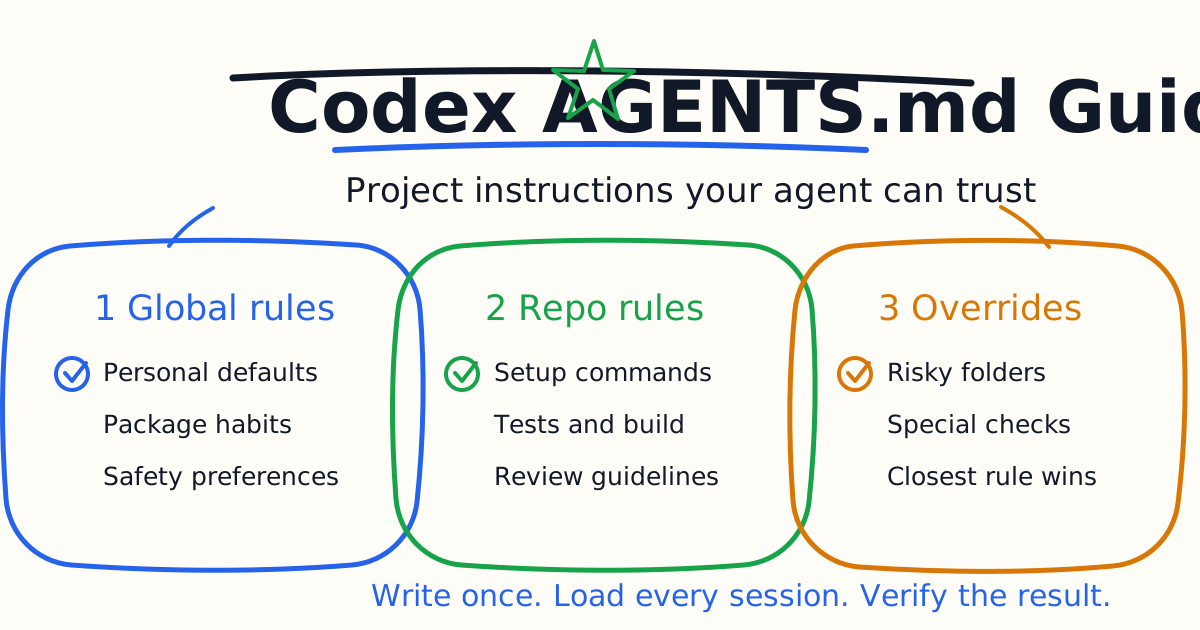
AGENTS.md is one of the highest-leverage files you can add to a repository that uses Codex. It turns repeated reminders into durable project instructions. Instead of telling Codex every session which package manager to use, which tests matter, which directories are generated, and what a safe review looks like, you write those rules once and let Codex load them before it starts working.
This guide shows how to write a useful AGENTS.md for Codex, where to put it, what to include, what to avoid, and how to verify that Codex is actually reading the right instructions.
Quick Answer
Create an AGENTS.md file at the repository root. Use it for stable project guidance: package manager, setup commands, lint and test commands, coding conventions, risky areas, generated files, review expectations, and deployment cautions. Keep it short enough to be read every session.
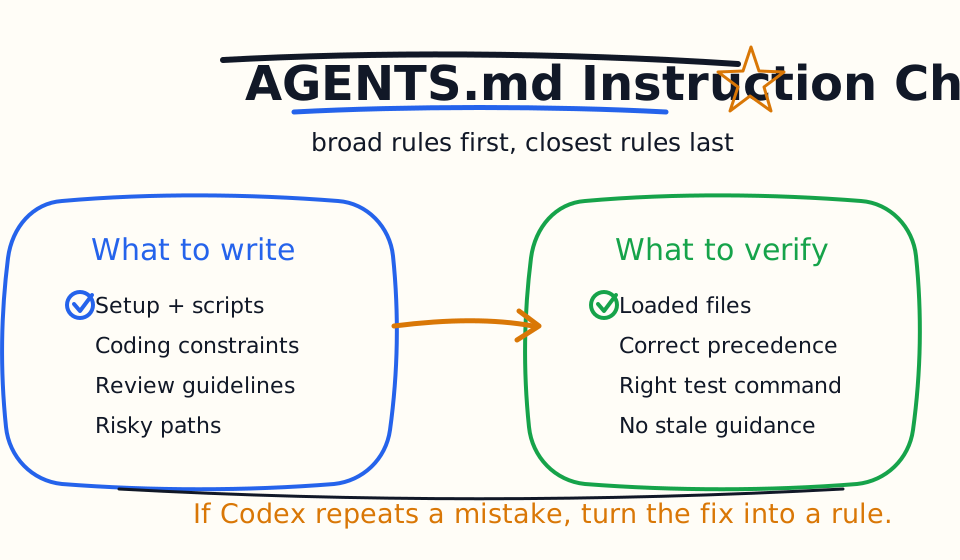
For specialized areas, add another AGENTS.md or AGENTS.override.md inside the relevant subdirectory. Codex builds an instruction chain from broader guidance to more specific guidance, so rules closer to the current working directory can override broader ones.
Do not put secrets, tokens, private passwords, temporary debugging notes, or giant documentation dumps into AGENTS.md. The file should teach Codex how to work in the repository, not replace the repository.
Why AGENTS.md Matters
AI coding agents are only as useful as the context they can trust. A prompt can describe the current task, but it is a poor place for permanent rules. If your team always uses pnpm, always runs a narrow test before a full build, never edits generated files, and treats authentication changes as high risk, those rules belong in persistent project guidance.
AGENTS.md gives Codex a stable operating manual. That improves three things:
- The first plan is less random.
- The diff is easier to review.
- The verification step is more likely to match the project.
The most valuable AGENTS.md files are practical. They do not try to explain the whole company. They answer the questions Codex needs before making a change: where to work, what to avoid, how to test, and how to summarize risk.
Where Codex Looks For Instructions
OpenAI's Codex documentation describes layered instruction discovery. Codex can load global guidance from the Codex home directory, then project guidance from the repository path, then more specific guidance as it moves toward the current working directory.
The practical rule is simple: put broad rules near the root and specialized rules near the code they control.
Use this layout:
my-app/
  AGENTS.md
  package.json
  src/
    AGENTS.md
    components/
  services/
    payments/
      AGENTS.override.md
      charge.ts
The root file can describe package manager, scripts, project structure, and general review expectations. A nested payments file can add stricter rules: never change payment callbacks casually, run payment-specific tests, and do not log sensitive data.
A Good Starter AGENTS.md
Start with a short file. You can improve it after Codex makes a few real changes.
# AGENTS.md

## Project setup

- Use `pnpm` for dependency commands.
- Run `pnpm install` only when dependencies are missing or package files changed.
- Do not edit generated directories such as `.next/`, `dist/`, `coverage/`, or `node_modules/`.

## Common checks

- For UI changes, run `pnpm type-check` and `pnpm build`.
- For small logic changes, run the closest related test first.
- If a check cannot run locally, explain why in the final summary.

## Coding rules

- Follow existing component and service patterns.
- Keep changes narrow and avoid unrelated refactors.
- Do not add a new dependency unless the task explicitly requires it.

## Review expectations

- Summarize changed files, verification commands, and remaining risk.
- Call out changes touching auth, payment, data deletion, credentials, or deployment config.
This is enough to improve many Codex sessions. It tells Codex how to work, how to verify, and how to report back.
What To Put In AGENTS.md
Use AGENTS.md for stable instructions that will still be true next week.
Good content includes:
| Section | What To Include |
|---|---|
| Project setup | Package manager, install command, required runtime, local server command |
| Test commands | Narrow tests, full test suite, type check, lint, build |
| Architecture notes | Where routes, services, schemas, components, and content live |
| Risk boundaries | Auth, billing, user data, migrations, deployment, secrets |
| Generated files | Directories or files Codex should not edit |
| Review rules | Summary format, evidence required, risk categories |
| Style rules | Local conventions not enforced by formatter or linter |
Good AGENTS.md guidance is specific enough to change behavior. "Write clean code" is not useful. "Do not add a new state library for one component fix" is useful.
What Not To Put In AGENTS.md
Do not turn AGENTS.md into a knowledge landfill. If the file becomes too long, Codex may have to spend attention on stale or irrelevant instructions.
Avoid:
- Secrets, passwords, tokens, private keys, or production credentials.
- Long product roadmaps that do not affect coding behavior.
- Full API documentation that already exists elsewhere.
- Temporary debugging notes from one incident.
- Conflicting rules that make Codex guess which instruction matters.
- Commands that are destructive by default.
- Broad permission statements such as "always run anything."
The file should reduce ambiguity, not create more of it.
Add Review Guidelines For Codex Reviews
If you use Codex for code review, add a dedicated review section. OpenAI's Codex GitHub review documentation says Codex can follow review guidance from AGENTS.md, and more specific guidance can live closer to changed files.
Use:
## Review guidelines

- Prioritize correctness, security, data loss, auth bypasses, and broken tests.
- Treat cosmetic style comments as low priority unless they hide a real bug.
- Check that new API routes preserve authentication and rate limits.
- Check that user-visible changes include error and loading states.
- Do not approve changes that log PII, tokens, or payment data.
This helps Codex focus on high-signal review comments. A review agent that comments on every style preference becomes noise. A review agent that catches serious risks earns trust.
Use Nested Rules For Risky Areas
Nested instructions are useful when one part of the repository has special rules.
Example:
# services/payments/AGENTS.override.md

## Payments service rules

- Run `pnpm test payments` after changing payment logic.
- Do not change webhook signature verification without explicit product and security review.
- Never log full card data, customer tokens, webhook secrets, or raw provider payloads.
- Include rollback notes for payment behavior changes.
This is better than placing every payment rule in the root file. Codex only needs specialized rules when it is working in that area. Keeping rules close to the code also makes ownership clearer for human maintainers.
Verify That Codex Reads The File
After you add or change AGENTS.md, verify it.
Run Codex from the repository root and ask:
codex "Summarize the active project instructions before doing any work."
For a nested directory, ask:
codex --cd services/payments "List the instruction files and rules you loaded."
You are checking two things: Codex sees the correct files, and the rules it reports match the behavior you want. If the wrong guidance appears, look for an override file in a parent directory or a global file under your Codex home directory.
Troubleshooting
If Codex ignores your instructions, confirm the file is named correctly and is not empty. If you use another file name, configure fallback filenames in Codex configuration. If instructions appear stale, restart the Codex session in the target directory so it rebuilds the instruction chain.
If too much guidance is loaded, split rules into nested files. Put only universal rules at the root. Put specialized rules near the specialized code.
If instructions conflict, rewrite them. A coding agent will not reliably infer your preferred exception model from vague wording. Say which rule wins.
Bottom Line
AGENTS.md is not documentation for humans first. It is operating guidance for Codex. Use it to define setup, constraints, checks, review expectations, and safety boundaries. Keep it short, specific, and close to the code it governs.
The best result is boring in the right way: Codex starts each task with the same project rules, makes smaller diffs, runs the expected checks, and gives reviewers the evidence they need.
Related Codex Tutorials
- Codex Quick Start
- Codex CLI Tutorial
- Codex IDE Extension Tutorial
- Codex Prompts for Developers
- Codex MCP Guide
- Codex Cloud Tasks Guide
- Codex Cloud Environment Setup Guide
- Codex Exec Automation Guide
- Codex GitHub Action Tutorial
- Codex Permissions and Sandbox Guide
- Codex Image Input Guide
- Codex Code Review Tutorial
- Codex vs Claude Code
Official References
Decision Checklist For Codex AGENTS.md Guide
Use this guide as a decision filter before a sales call, trial, or migration plan. For Codex AGENTS.md Guide, the practical question is whether the topic connects Codex AGENTS.md, AGENTS.md guide, Codex tutorial to a measurable workflow outcome. A good decision should improve delivery speed, quality, cost control, or operational confidence without creating hidden review, security, or migration work.
- Generated changes survive code review with fewer rewrites, fewer broad diffs, and fewer style corrections.
- The assistant understands multi-file context, tests, build failures, private repository rules, and local conventions.
- Administrators can manage seats, data controls, policy settings, and usage visibility without blocking developers.
Pilot Plan
A useful pilot is small enough to finish quickly but realistic enough to expose integration, data, workflow, and pricing issues. Avoid demo-only tests. The trial should use real tasks, real constraints, and a baseline from the current process so the team can decide with evidence instead of impressions.
- Give each candidate the same bug fix, failing-test repair, refactor, and explanation task.
- Track accepted diffs, reviewer comments, rework time, test pass rate, and developer satisfaction.
- Run the trial with senior maintainers and newer engineers because the value pattern is different for each group.
Metrics To Track
Track metrics that connect Codex AGENTS.md Guide to outcomes a budget owner and an engineering owner can both understand. A tool can look impressive in a demo and still fail if usage is low, quality is uneven, or the cost model changes under real workload volume.
- Accepted AI-assisted diffs, rejected suggestions, reviewer comments, and post-merge fixes.
- Time to repair failing tests, explain unfamiliar modules, and complete safe refactors.
- Seat utilization, premium request exhaustion, and policy exceptions for sensitive repositories.
Budget And Risk Review
Commercially useful AI tooling decisions should include the subscription or API price, but they should also include support load, review time, observability, privacy controls, switching cost, and the cost of wrong or low-quality output. Treat the first estimate as a working model and update it with production evidence.
- Confirm private code handling, training opt-out, data retention, and enterprise policy controls.
- Watch for over-generation: large patches that look productive but increase review cost.
- Compare cost per accepted change rather than cost per seat alone.
Revisit the assistant after 30 days of real pull requests. A useful coding tool should reduce review latency and onboarding friction without increasing risky generated code.
Editorial note
AI Jupyter writes independent guides for technical readers. Product details, pricing, and feature names can change, so readers should verify commercial terms on the official vendor site before buying.
Reviewed by the AI Jupyter Editorial Team.