
AI Coding Tools
Codex Prompts for Developers
Practical Codex prompts for developers who want better codebase understanding, bug fixes, tests, reviews, and small verified diffs.
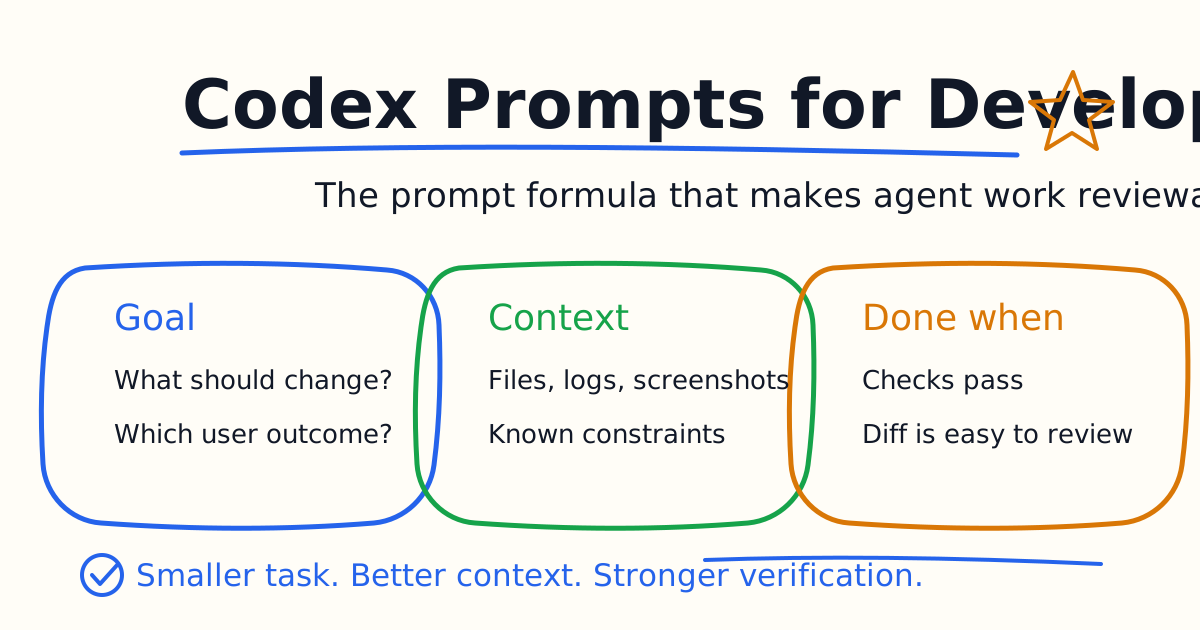
Good Codex prompts turn vague developer intent into reviewable agent work. A weak prompt asks Codex to "fix this" or "improve the app." A strong prompt tells Codex what outcome you want, where to start, what constraints to follow, and how to prove the work is complete.
This guide gives you practical Codex prompts for real developer workflows: understanding a codebase, fixing bugs, writing tests, making frontend changes, reviewing diffs, and using AGENTS.md to make good instructions reusable.
Quick Answer
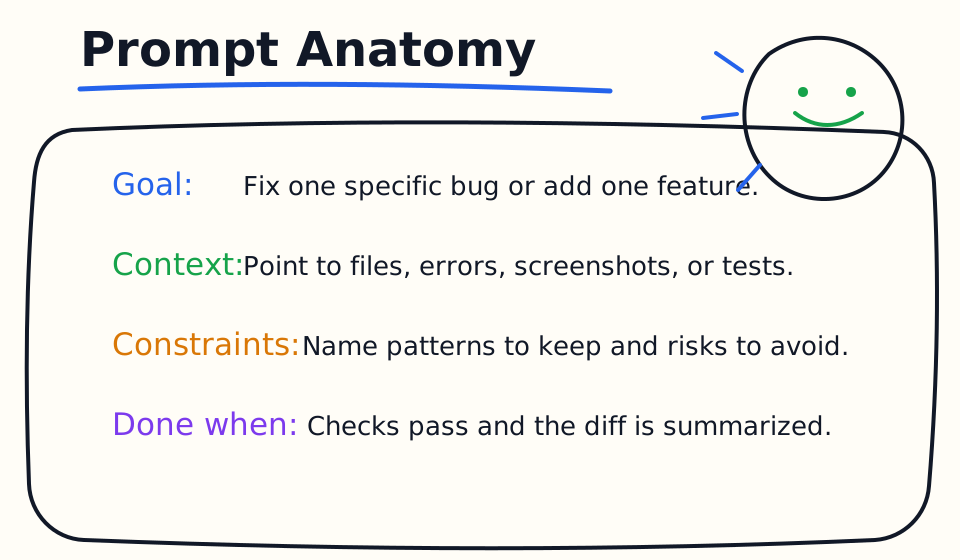
The best Codex prompt format is:
Goal: What should change?
Context: Which files, errors, screenshots, docs, or tests matter?
Constraints: What patterns, risks, or boundaries should Codex follow?
Done when: Which checks should pass, and what should Codex summarize?
This format works because Codex can verify its own work. The official Codex prompting guidance emphasizes context, smaller focused tasks, and validation steps. In everyday use, the prompt should make the final diff easier to review, not just make Codex write more code.
The Four-Part Prompt Formula
Use Goal to describe the desired product or engineering outcome. Avoid vague verbs like improve, optimize, or clean up unless you define the measurable result.
Use Context to point Codex at relevant files, logs, screenshots, stack traces, failing tests, product notes, or examples. Codex can search, but a starting point saves time and reduces wrong assumptions.
Use Constraints to keep the diff reviewable. Tell Codex to keep existing architecture, avoid new dependencies, preserve public APIs, follow nearby patterns, or avoid touching generated files.
Use Done when to define proof. This can be a passing test, successful build, screenshot comparison, no TypeScript errors, or a clear explanation of why verification could not run.
Codebase Understanding Prompts
Start with understanding before editing when the repository is unfamiliar.
Explain this repository for a new developer. Identify the main entry points, important folders, test commands, build command, and the three files I should read first.
Trace how a user login request moves through this codebase. Name the files involved, the data flow, and the tests that protect it.
Find where feature flags are defined and consumed. Summarize the pattern and warn me about risky places to change.
These prompts create a map. They are especially useful before bug fixes because they let Codex gather context without changing code.
Bug Fix Prompts
Bug prompts should include reproduction steps and a verification target.
Goal: Fix the bug shown in this stack trace.
Context: Start from the error below and inspect the related files only.
Constraints: Make the smallest behavior-preserving fix. Do not rewrite the module.
Done when: The relevant test passes, or you explain exactly why it cannot be run here.
This test fails after the recent refactor. Diagnose the root cause, fix the smallest necessary code path, and run only the related test first.
The mobile layout overflows horizontally at 390px width. Find the component causing it, patch the layout, and verify there is no document-level horizontal scroll.
The key is to keep Codex from turning a bug into a broad rewrite. Ask it to diagnose first, then patch narrowly.
Test Writing Prompts
Codex is useful for tests when the behavior is clear.
Add tests for the validation behavior in this file. Follow the style of nearby tests. Do not change production code unless a test exposes a real bug.
Write a regression test for this bug before fixing it. Show the failing test result, then implement the smallest fix and rerun the test.
Inspect the current test suite and identify the highest-value missing test for this feature. Add only that test and explain what risk it covers.
Good test prompts ask Codex to match local patterns. That keeps the result easier for maintainers to accept.
Frontend Prompts
Frontend prompts should include the state, viewport, and visual expectation.
Add an empty state to the table when there are no results. Match the existing design system, keep the layout stable on mobile, and verify at desktop and 390px width.
The button label wraps awkwardly on mobile. Fix the layout without reducing accessibility or hiding text. Verify that no UI elements overlap.
Implement the loading state for this panel using the existing skeleton pattern. Do not introduce a new component library.
When the task is visual, attach a screenshot or design image and describe exactly what should change.
Backend Prompts
Backend prompts should define API behavior, errors, and tests.
Add input validation to this endpoint. Return the existing error shape, update or add tests for invalid input, and do not change authentication behavior.
Trace this API request from route to database write. Identify any missing authorization checks before editing.
Add pagination to this list endpoint. Preserve the current response fields, add tests for default and custom page sizes, and document any compatibility risk.
For backend work, name the boundaries Codex must not cross: auth, billing, database migrations, rate limits, or public API compatibility.
Review Prompts
Codex can help review your own work before another person does.
Review my uncommitted changes. Prioritize bugs, regressions, missing tests, security risks, and behavior that conflicts with existing patterns.
Review this diff as if it were a pull request. Give findings first, ordered by severity, with file references and concrete fixes.
Check whether this change is too broad. Suggest the smallest diff that would satisfy the original request.
Review prompts are strongest when you tell Codex what kind of risk matters. A payment change, UI accessibility change, and documentation change need different review focus.
Prompts For AGENTS.md
When a prompt works repeatedly, turn it into durable guidance.
Read the last three corrections I gave you in this thread. Propose a short AGENTS.md rule that would prevent the same mistake next time.
Update AGENTS.md with the build, test, and generated-file rules you discovered. Keep it short and specific.
Audit AGENTS.md for vague rules. Rewrite only the unclear lines into actionable project instructions.
AGENTS.md should stay practical. Put recurring repo conventions there, not one-off task details.
25 Copy-Paste Codex Prompts
Use these as starting points:
- Explain this codebase and list the safest first improvement.
- Find the tests that protect this feature before making changes.
- Fix this failing test with the smallest code change.
- Add one regression test for this bug, then fix it.
- Refactor this duplicated logic without changing public behavior.
- Add input validation and tests for invalid input.
- Update this UI state and verify mobile layout.
- Review my uncommitted changes for bugs and missing tests.
- Summarize the risk of this diff for a reviewer.
- Find dead code related to this feature, but do not delete anything yet.
- Identify the command to run the narrowest relevant test.
- Improve this README section using package scripts as source of truth.
- Trace this API request from route to database access.
- Find the likely source of this stack trace.
- Compare two implementation options and recommend the smaller diff.
- Add error handling without changing the success path.
- Make this component accessible without changing visual layout.
- Explain why this build fails and propose a fix before editing.
- Convert this vague task into a concrete implementation plan.
- Inspect nearby files and follow their pattern.
- Do not add dependencies unless you explain why existing tools are insufficient.
- Stop after diagnosis and wait for my next instruction.
- Run the relevant check and paste the important result.
- Re-review the final diff after the test passes.
- Write a concise PR summary and test plan.
Common Prompt Mistakes
The first mistake is asking for too much at once. Codex handles complex work better when you split it into smaller focused steps. If you are not sure how to split the work, ask Codex to propose a plan first.
The second mistake is omitting verification. A prompt that ends with "make the change" is weaker than one that ends with "run the related test and summarize the result."
The third mistake is giving no constraints. If adding a dependency, changing an API, touching auth, or editing generated files would be risky, say so directly.
The fourth mistake is not reviewing the final diff. Codex can help you review, but you still own the decision to ship.
Bottom Line
The best Codex prompts do not try to sound clever. They make work concrete. Give Codex a goal, useful context, real constraints, and a done condition. Then let the agent inspect, edit, verify, and summarize a small diff you can actually review.
Related Codex Tutorials
- Codex Quick Start
- Codex CLI Tutorial
- Codex AGENTS.md Guide
- Codex MCP Guide
- Codex Cloud Tasks Guide
- Codex Exec Automation Guide
- Codex GitHub Action Tutorial
- Codex Permissions and Sandbox Guide
- Codex Image Input Guide
- Codex Code Review Tutorial
- Codex vs Claude Code
- Claude Code Quick Start
- Claude Code CLI Tutorial
- Claude Code Settings and Memory Guide
Official References
Decision Checklist For Codex Prompts for Developers
Use this guide as a decision filter before a sales call, trial, or migration plan. For Codex Prompts for Developers, the practical question is whether the topic connects Codex prompts, AI coding prompts, Codex tutorial to a measurable workflow outcome. A good decision should improve delivery speed, quality, cost control, or operational confidence without creating hidden review, security, or migration work.
- Generated changes survive code review with fewer rewrites, fewer broad diffs, and fewer style corrections.
- The assistant understands multi-file context, tests, build failures, private repository rules, and local conventions.
- Administrators can manage seats, data controls, policy settings, and usage visibility without blocking developers.
Pilot Plan
A useful pilot is small enough to finish quickly but realistic enough to expose integration, data, workflow, and pricing issues. Avoid demo-only tests. The trial should use real tasks, real constraints, and a baseline from the current process so the team can decide with evidence instead of impressions.
- Give each candidate the same bug fix, failing-test repair, refactor, and explanation task.
- Track accepted diffs, reviewer comments, rework time, test pass rate, and developer satisfaction.
- Run the trial with senior maintainers and newer engineers because the value pattern is different for each group.
Metrics To Track
Track metrics that connect Codex Prompts for Developers to outcomes a budget owner and an engineering owner can both understand. A tool can look impressive in a demo and still fail if usage is low, quality is uneven, or the cost model changes under real workload volume.
- Accepted AI-assisted diffs, rejected suggestions, reviewer comments, and post-merge fixes.
- Time to repair failing tests, explain unfamiliar modules, and complete safe refactors.
- Seat utilization, premium request exhaustion, and policy exceptions for sensitive repositories.
Budget And Risk Review
Commercially useful AI tooling decisions should include the subscription or API price, but they should also include support load, review time, observability, privacy controls, switching cost, and the cost of wrong or low-quality output. Treat the first estimate as a working model and update it with production evidence.
- Confirm private code handling, training opt-out, data retention, and enterprise policy controls.
- Watch for over-generation: large patches that look productive but increase review cost.
- Compare cost per accepted change rather than cost per seat alone.
Revisit the assistant after 30 days of real pull requests. A useful coding tool should reduce review latency and onboarding friction without increasing risky generated code.
Editorial note
AI Jupyter writes independent guides for technical readers. Product details, pricing, and feature names can change, so readers should verify commercial terms on the official vendor site before buying.
Reviewed by the AI Jupyter Editorial Team.