
AI Coding Tools
Codex Cloud Tasks Guide
A practical Codex cloud tasks guide for configuring environments, setup scripts, AGENTS.md, internet access, verification, and pull request workflows.
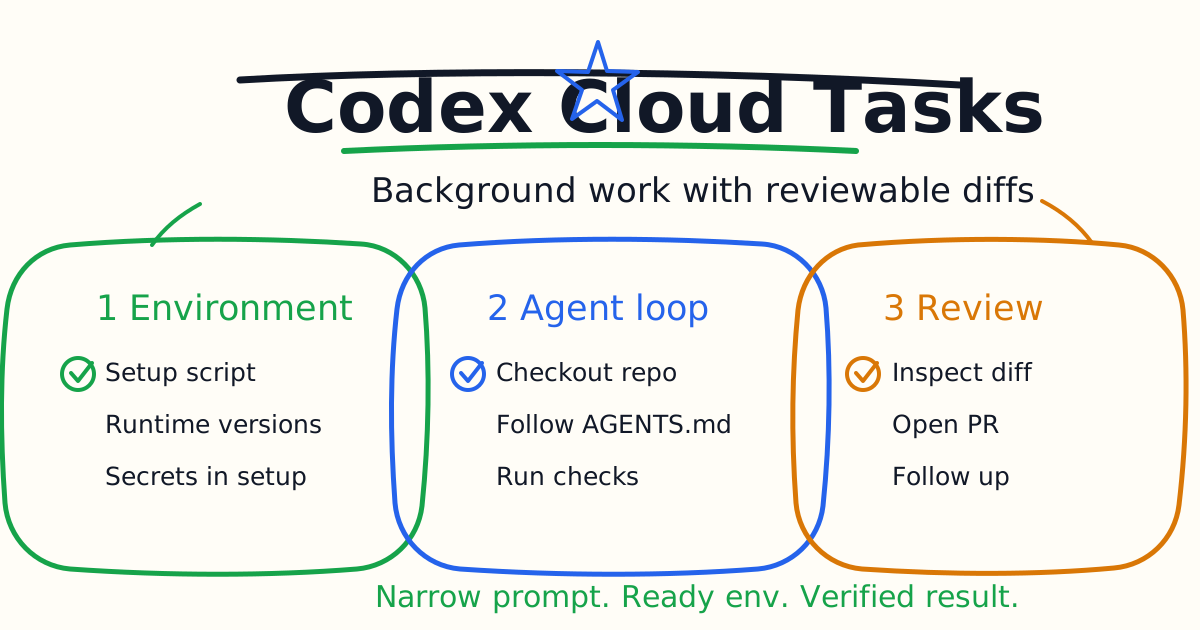
Codex cloud tasks let you send coding work to an OpenAI-managed environment instead of keeping every agent session tied to your local machine. That is useful when a task can run in the background, when you want parallel attempts, or when you want Codex to work from a clean container with a known setup script.
This guide explains how Codex cloud tasks work, what to configure before using them, how AGENTS.md fits into the workflow, how to think about internet access and secrets, and how to write prompts that produce reviewable pull request changes.
Quick Answer
Use Codex cloud tasks for work that can be described clearly and verified in a repository: fix a failing test, update documentation, refactor one small module, investigate CI failure, add a narrow feature, or run multiple solution attempts.
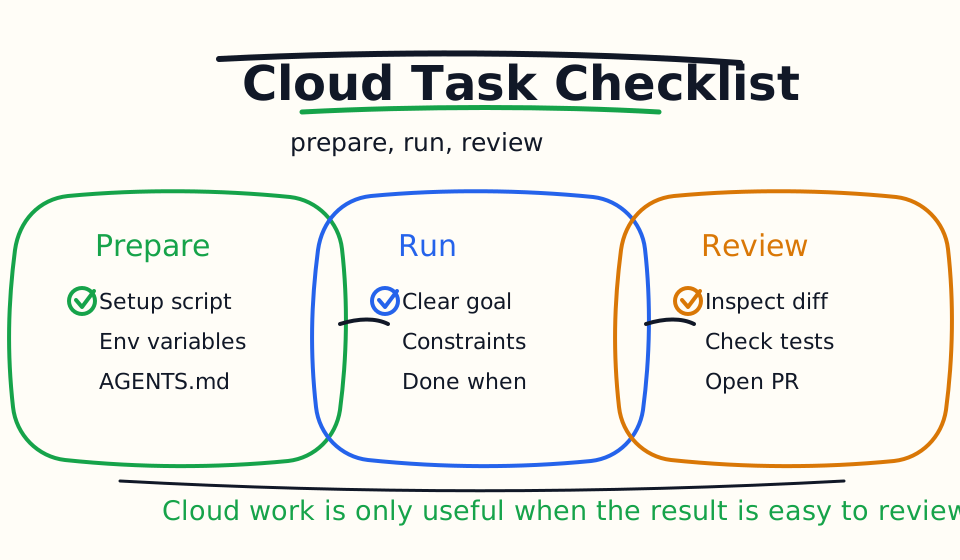
Before relying on cloud tasks, configure the environment: package versions, setup script, environment variables, secrets, internet access, and any maintenance script. Add AGENTS.md to the repository so Codex knows the correct package manager, test commands, generated files, and review expectations.
Do not send vague tasks such as "improve the app." A cloud task should have a goal, context, constraints, and a done condition.
How Codex Cloud Tasks Run
OpenAI's Codex cloud environment documentation describes the basic flow:
- Codex creates a container and checks out the selected repository branch or commit.
- Codex runs the setup script, and may run a maintenance script when resuming a cached container.
- Codex applies internet access settings.
- The agent edits code, runs commands, and tries to validate its work.
- Codex shows an answer and a diff, and you can open a pull request or continue with follow-up questions.
The most important detail is that the cloud task is only as good as the environment. If dependencies are missing, test commands are undocumented, or the task does not say what "done" means, the result will be inconsistent.
When Cloud Tasks Are Better Than Local Sessions
Use a local Codex session when you need hands-on steering, local app state, private files, or fast back-and-forth review.
Use a cloud task when:
- The task is well scoped.
- The repository is available to the cloud environment.
- Setup can be scripted.
- Verification can run in the container.
- The result can be reviewed as a diff.
- You want Codex to work while you do something else.
Cloud tasks are especially useful for bug fixes, documentation updates, CI investigation, dependency-safe refactors, and pull request preparation.
Configure The Environment First
Codex cloud environments control what Codex installs and runs. The environment should answer these questions:
| Question | Good Environment Answer |
|---|---|
| Which runtime versions? | Pin Node.js, Python, or other language versions when needed |
| How are dependencies installed? | Use a setup script or automatic package manager setup |
| Which tools are required? | Install linters, formatters, type checkers, test runners |
| Which variables are needed? | Use environment variables for non-secret configuration |
| Which secrets are needed? | Add secrets only when setup truly requires them |
| Is internet needed? | Keep agent internet off unless the task needs it |
For many projects, the setup script is the difference between a useful cloud task and a failed one.
Write A Good Setup Script
Keep the setup script deterministic. Install the tools and dependencies required for normal development and tests.
Example:
corepack enable
pnpm install
pnpm run type-check
For a Python project:
pip install -r requirements.txt
pytest --version
Do not put task-specific hacks in the setup script. The setup script prepares the environment; the prompt describes the task.
The official docs note that setup scripts run in a separate Bash session from the agent phase. If you need environment variables to persist, configure them in environment settings or a shell startup file rather than relying on export inside the setup script.
Use AGENTS.md To Teach The Cloud Agent
Cloud tasks become much better when the repository includes AGENTS.md.
Add rules like:
# AGENTS.md

## Commands

- Use `pnpm` for package commands.
- Run `pnpm type-check` after TypeScript changes.
- Run the closest related test before running the full suite.

## Boundaries

- Do not edit generated files.
- Do not change auth, billing, or deployment config without calling it out.

## Review

- Summarize changed files, commands run, and remaining risk.
This gives Codex durable project context inside both local and cloud workflows. It also helps make cloud results easier to review because the agent knows what evidence you expect.
Internet Access And Secrets
Codex cloud setup scripts can use internet access to install dependencies. During the agent phase, internet access is off by default unless you configure it differently.
That default is good. Many coding tasks should not require live internet during the edit phase. If the agent needs external docs, package registries, or API access during the task, enable the narrowest useful access.
Secrets require extra care. The Codex cloud environment docs distinguish secrets from ordinary environment variables. Secrets are only available during setup and are removed before the agent phase. That is a safer default because the agent can install private dependencies without carrying secrets into the editing loop.
Do not use cloud tasks as a reason to expose production credentials broadly. If a task needs production access, rethink the task. Most coding work should run against tests, fixtures, mocks, or staging-safe credentials.
Launch Cloud Tasks From The CLI
The Codex CLI can launch cloud tasks with codex cloud.
Open the interactive picker:
codex cloud
Start a direct cloud task:
codex cloud exec --env ENV_ID "Summarize open bugs"
For tasks where multiple solution attempts are useful, request more than one attempt:
codex cloud exec --env ENV_ID --attempts 3 "Fix the failing import test with the smallest safe patch"
Use multiple attempts carefully. They can be useful for ambiguous failures, but they also create more results to review. More attempts are not automatically better if the task itself is vague.
Prompt Template For Cloud Tasks
Use this structure:
Goal: Fix the failing checkout validation test.

Context: Start from the test output below. Inspect only the checkout validation path first.

Constraints: Keep the public API stable. Do not add a new dependency. Do not touch payment provider configuration.

Done when: The related test passes, and the final response lists changed files, verification commands, and remaining risk.
This prompt works because it gives Codex a visible finish line. In cloud work, that matters even more than in a local interactive session because you may not be watching every step.
Good First Cloud Tasks
Start with tasks that are easy to verify:
- Fix one failing test.
- Update one documentation page from codebase facts.
- Add one missing validation branch.
- Improve one error message and update the related test.
- Investigate a CI failure and propose a minimal patch.
- Review a small refactor for missing tests.
Avoid first tasks that require product judgment, production credentials, broad architecture changes, or manual QA that the cloud environment cannot perform.
Review The Result
When the cloud task finishes, do not merge blindly. Review the diff.
Check:
- Did the diff match the goal?
- Did the agent touch unrelated files?
- Did verification actually run?
- Does the verification command cover the changed behavior?
- Are there new dependencies?
- Are secrets or private values exposed?
- Is the final summary honest about what was not tested?
If the result is close but not complete, ask a follow-up with a narrow repair instruction. If the result is broad or risky, reject it and use the transcript to refine your next task prompt.
Common Mistakes
The first mistake is launching cloud tasks before environment setup works. If dependencies cannot install reliably, the agent cannot verify reliably.
The second mistake is omitting AGENTS.md. Without project instructions, Codex has to infer package manager, test commands, generated files, and review rules.
The third mistake is enabling broad internet access because it feels convenient. Start with the default offline agent phase and expand only when the task requires it.
The fourth mistake is putting secrets where the agent does not need them. Keep secrets limited to setup whenever possible.
The fifth mistake is treating cloud output as done work. The output is a proposed diff. You still review it.
Bottom Line
Codex cloud tasks are strongest when the task is narrow, the environment is ready, AGENTS.md explains the project, and verification is built into the prompt.
Use cloud for work that can run in the background and return as a reviewable diff. Keep local sessions for messy exploration, sensitive context, or work that needs close human steering.
Related Codex Tutorials
- Codex Quick Start
- Codex IDE Extension Tutorial
- Codex CLI Tutorial
- Codex AGENTS.md Guide
- Codex Cloud Environment Setup Guide
- Codex MCP Guide
- Codex Code Review Tutorial
- Codex Exec Automation Guide
- Codex GitHub Action Tutorial
- Codex Permissions and Sandbox Guide
- Codex Image Input Guide
- Codex vs Claude Code
Official References
Decision Checklist For Codex Cloud Tasks Guide
Use this guide as a decision filter before a sales call, trial, or migration plan. For Codex Cloud Tasks Guide, the practical question is whether the topic connects Codex cloud tasks, Codex cloud, Codex tutorial to a measurable workflow outcome. A good decision should improve delivery speed, quality, cost control, or operational confidence without creating hidden review, security, or migration work.
- Generated changes survive code review with fewer rewrites, fewer broad diffs, and fewer style corrections.
- The assistant understands multi-file context, tests, build failures, private repository rules, and local conventions.
- Administrators can manage seats, data controls, policy settings, and usage visibility without blocking developers.
Pilot Plan
A useful pilot is small enough to finish quickly but realistic enough to expose integration, data, workflow, and pricing issues. Avoid demo-only tests. The trial should use real tasks, real constraints, and a baseline from the current process so the team can decide with evidence instead of impressions.
- Give each candidate the same bug fix, failing-test repair, refactor, and explanation task.
- Track accepted diffs, reviewer comments, rework time, test pass rate, and developer satisfaction.
- Run the trial with senior maintainers and newer engineers because the value pattern is different for each group.
Metrics To Track
Track metrics that connect Codex Cloud Tasks Guide to outcomes a budget owner and an engineering owner can both understand. A tool can look impressive in a demo and still fail if usage is low, quality is uneven, or the cost model changes under real workload volume.
- Accepted AI-assisted diffs, rejected suggestions, reviewer comments, and post-merge fixes.
- Time to repair failing tests, explain unfamiliar modules, and complete safe refactors.
- Seat utilization, premium request exhaustion, and policy exceptions for sensitive repositories.
Budget And Risk Review
Commercially useful AI tooling decisions should include the subscription or API price, but they should also include support load, review time, observability, privacy controls, switching cost, and the cost of wrong or low-quality output. Treat the first estimate as a working model and update it with production evidence.
- Confirm private code handling, training opt-out, data retention, and enterprise policy controls.
- Watch for over-generation: large patches that look productive but increase review cost.
- Compare cost per accepted change rather than cost per seat alone.
Revisit the assistant after 30 days of real pull requests. A useful coding tool should reduce review latency and onboarding friction without increasing risky generated code.
Editorial note
AI Jupyter writes independent guides for technical readers. Product details, pricing, and feature names can change, so readers should verify commercial terms on the official vendor site before buying.
Reviewed by the AI Jupyter Editorial Team.